

Framer Review 2026: Is Framer Worth It or Just Another No-Code Website Builder?
Most website builders promise one thing:
“Build a beautiful website without code.”
But Framer is not trying to be just another drag-and-drop website builder.
Framer is built for people who care about design, speed, animations, responsive layouts, landing pages, and polished digital experiences. It sits somewhere between Figma, Webflow, and a modern no-code deployment tool.
That is why startups, designers, agencies, creators, and indie hackers are paying attention.
The real question is not just:
“Can Framer build websites?”
The better question is:
“Is Framer worth it for your business compared to Webflow, WordPress, Wix, Squarespace, or simply coding your own site?”
The answer: Framer is worth it if your main goal is to launch beautiful marketing websites, landing pages, startup pages, portfolios, and conversion-focused pages fast. But it may not be the best option if you need a complex blog, advanced CMS, large content database, heavy e-commerce, or deep backend customization.
Your supplied review notes repeatedly point to the same pattern: users love Framer for speed, design quality, animations, Figma-style workflow, and fast publishing, but they also mention CMS limitations, pricing concerns, beginner learning curve, and weaker flexibility for complex websites.
What Is Framer?
Framer is a no-code website builder that lets users design, build, and publish websites without traditional frontend development.
Its biggest selling point is that it feels closer to a design tool than a traditional website builder. Framer promotes built-in CMS, SEO settings, performance-focused hosting, real-time collaboration, localization, analytics, and A/B testing/growth features.
That makes Framer especially attractive for:
- Startup landing pages
- SaaS websites
- Portfolio websites
- Agency client websites
- Product launch pages
- Modern business websites
- Interactive pages with animations
- Fast MVP marketing sites
Framer’s strongest promise is simple:
Design fast. Publish fast. Look premium without waiting on developers.
That matters because for many founders and small teams, the website is not the product. The website is the front door. Spending weeks building the front door can slow down the business.
Aqyreon Verdict: Is Framer Worth It?
Yes — Framer is worth it for fast, beautiful, modern websites.
Framer is one of the best tools for people who want to launch a polished website quickly without sacrificing visual quality.
It is especially strong for:
Founders who need a landing page before launch.
Designers who want to turn ideas into live websites.
Agencies that build premium marketing websites for clients.
Creators who want a clean personal brand site.
SaaS startups that need fast product pages, waitlists, and conversion funnels.
Affiliate marketers who want high-converting landing pages for campaigns.
But Framer is not perfect.
It is not the best choice for every website. If your business depends on a large content engine, advanced database relationships, deep plugin flexibility, or complex e-commerce workflows, tools like WordPress, Webflow, or custom development may be better.
What Makes Framer Powerful?
1. Framer Helps You Launch Faster
This is Framer’s biggest advantage.
A developer can build a landing page from scratch using Next.js, Tailwind CSS, and a hosting platform. But that can take time. Even a simple page may involve layout, responsiveness, animations, deployment, SEO tags, forms, performance checks, and revisions.
Framer compresses that process.
Many users in the supplied review notes praised Framer because it helped them launch websites in hours or days instead of weeks. Some specifically compared it against Webflow and custom-coded landing pages, saying Framer reduced time-to-market.
For startups, speed matters.
A landing page launched today can start collecting emails today.
A product page launched this week can start testing demand this week.
A delayed website can delay validation, revenue, and investor conversations.
That is why Framer is not just a design tool. It is a business speed tool.
2. Framer Feels Natural for Designers
Framer’s interface feels familiar to people who already understand visual design tools like Figma.
That is one reason designers like it. Instead of designing in one platform, handing the design to a developer, waiting for implementation, reviewing the result, and requesting changes, Framer allows a designer to move much closer to final production.
The user reviews you provided repeatedly mention Framer’s Figma-like experience, Figma integration, responsive design tools, component creation, variants, style management, breakpoints, and smooth transition from design to live site.
This is where Framer beats many traditional website builders.
It does not feel like a basic template editor. It feels like a design-first website production tool.
3. Framer Is Excellent for Animations and Interactions
Framer’s animation capabilities are one of its strongest features.
If your brand needs to feel modern, premium, and interactive, Framer can help you create that polished look without hiring a motion designer or frontend developer for every animation.
This matters for tech brands because the website is part of the product perception.
A clean, animated, high-performance landing page can make a startup feel more premium, more credible, and more investable.
For Aqyreon-style readers, this is important:
Design is not decoration. Design is trust.
When visitors land on your website, they decide within seconds whether your brand looks serious. Framer helps small teams create that premium feeling quickly.
4. Framer Includes Built-In Website Essentials
Framer is no longer just a prototyping tool. It now positions itself as a full website builder with built-in CMS, SEO, hosting, analytics, localization, and performance features.
That means users do not need to separately configure every part of the web stack.
You can build pages, publish them, manage content, optimize metadata, and collaborate with a team inside one ecosystem.
Framer’s pricing page also shows collaboration features, viewer access, paid editor seats, content editors, roles and permissions, password protection, redirects, site search, static files, and staging features depending on plan level.
For teams that want fewer tools and faster execution, that is valuable.
Where Framer Falls Short
1. Framer’s CMS Can Feel Limited
This is the biggest weakness.
Framer works well for simple blogs, landing pages, portfolios, startup websites, and basic content collections. But if you want a large content operation with advanced filtering, complex content relationships, custom taxonomies, deep editorial workflows, and thousands of structured posts, Framer may start to feel restrictive.
Your supplied review notes mention this several times. Users praised Framer’s simplicity but also said the CMS is not as flexible as Webflow, WordPress, or custom-built systems for advanced content structures.
This matters for affiliate websites and media brands.
For example, Aqyreon-style content may eventually need:
- Product review databases
- Comparison tables
- Affiliate link management
- Category hubs
- Author pages
- Schema markup
- Related content logic
- Dynamic tool directories
- Email capture funnels
- SEO plugin control
- Programmatic SEO pages
Framer can handle some of this, but WordPress or Webflow may be stronger for a content-heavy operation.
2. Pricing Can Add Up
Framer can feel affordable for one site. But if you are an indie hacker, agency, or founder launching multiple projects, pricing can scale quickly.
The supplied reviews mention that the per-site pricing structure can become expensive for people managing multiple micro-projects, staging environments, or client websites.
Framer’s pricing page also shows extra costs for editors and content editors, with additional editors listed at $20 per editor and content editors at $10 per editor.
That does not mean Framer is overpriced. It means you should calculate the real business use case.
If one Framer site helps you land clients, sell a SaaS subscription, generate leads, or promote affiliate offers, the cost can be worth it.
But if you are launching many experimental sites with low revenue, cheaper hosting plus WordPress or custom static pages may be more cost-effective.
3. Framer Still Has a Learning Curve
Framer is easier than many developer workflows, but it is not effortless.
Some beginners expect “no-code” to mean “no learning.” That is not true.
Framer still requires you to understand layouts, responsiveness, breakpoints, spacing, design hierarchy, CMS structure, and publishing settings.
Several reviews in your supplied notes say Framer can feel overwhelming at first, especially for people with no design or coding background.
So the honest verdict is:
Framer is easier than coding, often faster than Webflow, but still not magic for complete beginners.
4. Complex Websites May Need Something Stronger
Framer is excellent for visual websites. But if your website needs deep backend logic, complex membership systems, marketplace functions, heavy e-commerce, custom user dashboards, or advanced database workflows, Framer may not be enough by itself.
At that point, you may need:
- WordPress with plugins
- Webflow with advanced CMS structure
- Shopify for e-commerce
- Bubble for app-like workflows
- Next.js for custom builds
- Web app frameworks with backend development
Framer is best when the website is primarily a marketing, content, or brand experience — not a complex software application.
Framer vs Webflow
Which Is Better?
Framer is better for speed, design flow, animations, and fast landing pages.
Webflow is better for complex CMS, larger marketing sites, and advanced website structure.
Webflow’s May 2026 pricing update shows its Premium plan includes larger CMS capacity, with CMS items increasing to 20,000 and CMS collections increasing to 40 under the updated structure.
That is important because Webflow is still one of the strongest options for serious no-code website builds with structured CMS needs.
Choose Framer if:
- You want to launch fast
- You care about premium visual design
- You want smoother animations
- You like Figma-style workflows
- You are building a landing page, startup site, or portfolio
- You do not need a massive CMS
Choose Webflow if:
- You need stronger CMS flexibility
- You are building a larger business website
- You want more structure and design control
- You are comfortable with a steeper learning curve
- You need advanced client websites
- You want deeper control without fully coding
Aqyreon Take
Framer is better for speed.
Webflow is better for complexity.
For a startup launch page, Framer wins.
For a large SEO content site or complex business website, Webflow may win.
Framer vs WordPress
Which Is Better?
Framer is better for modern design and speed.
WordPress is better for blogging, SEO ecosystems, plugins, affiliate content, and long-term publishing scale.
WordPress remains powerful because of its ecosystem. You can add SEO plugins, affiliate link plugins, schema plugins, ad management tools, content tables, product review templates, email integrations, and analytics tools.
That makes WordPress a better choice for content-heavy websites like:
- Tech blogs
- Affiliate review sites
- News websites
- Niche media brands
- Product comparison websites
- Large resource libraries
Framer can create a beautiful blog, but WordPress is still stronger if your business model depends on publishing hundreds of posts and monetizing through SEO, ads, affiliate links, email capture, and content operations.
Aqyreon Take
Use Framer for a premium brand website.
Use WordPress for a serious publishing business.
For Aqyreon itself, WordPress may still be stronger as the main blog engine, while Framer could be excellent for landing pages, lead magnets, product pages, and premium campaign pages.
Framer vs Wix
Which Is Better?
Framer is better for designers and premium startup-style websites.
Wix is better for beginners, small businesses, bookings, e-commerce, and all-in-one business features.
Wix promotes itself as an easy website builder with 2,000+ templates, AI tools, custom domains, and business features.
Wix is great for local businesses, service providers, restaurants, appointment-based businesses, and people who want many business tools in one place.
Framer feels more premium and design-forward. Wix feels more beginner-friendly and business-tool-focused.
Choose Framer if:
- You want a sleek startup website
- You care about animations and modern design
- You already understand design tools
- You want a high-end visual feel
Choose Wix if:
- You are a beginner
- You need bookings, payments, email tools, and templates
- You want an all-in-one small business website
- You do not want to think much about design systems
Aqyreon Take
Framer is for brand polish.
Wix is for business convenience.
Framer vs Squarespace
Which Is Better?
Framer is better for custom modern design and interactions.
Squarespace is better for simple beautiful websites, creators, portfolios, and small business templates.
Squarespace does not offer a free plan, but it does offer a 14-day free trial and annual subscriptions can include one year of free domain registration for new websites.
Squarespace is easier for people who want a clean website quickly without learning much about layout systems. It is especially good for photographers, consultants, creators, local businesses, and service brands.
Framer gives more visual freedom and modern interaction design. Squarespace gives more template simplicity.
Aqyreon Take
Squarespace is easier.
Framer is more powerful for modern design.
Framer vs Custom Coding
Which Is Better?
Framer is better when speed matters.
Custom coding is better when control matters.
If you code your website with Next.js, Tailwind CSS, Astro, or another modern stack, you can control everything: performance, backend logic, database structure, integrations, SEO, deployment, and scalability.
But that control comes with a cost: time.
Framer is valuable because it helps teams avoid wasting developer hours on pages that do not require full custom engineering.
A developer should not always spend three days coding a landing page when Framer can ship it in one afternoon.
Aqyreon Take
Custom code is best for products.
Framer is best for marketing speed.
Use developers for your core platform.
Use Framer for fast marketing execution.
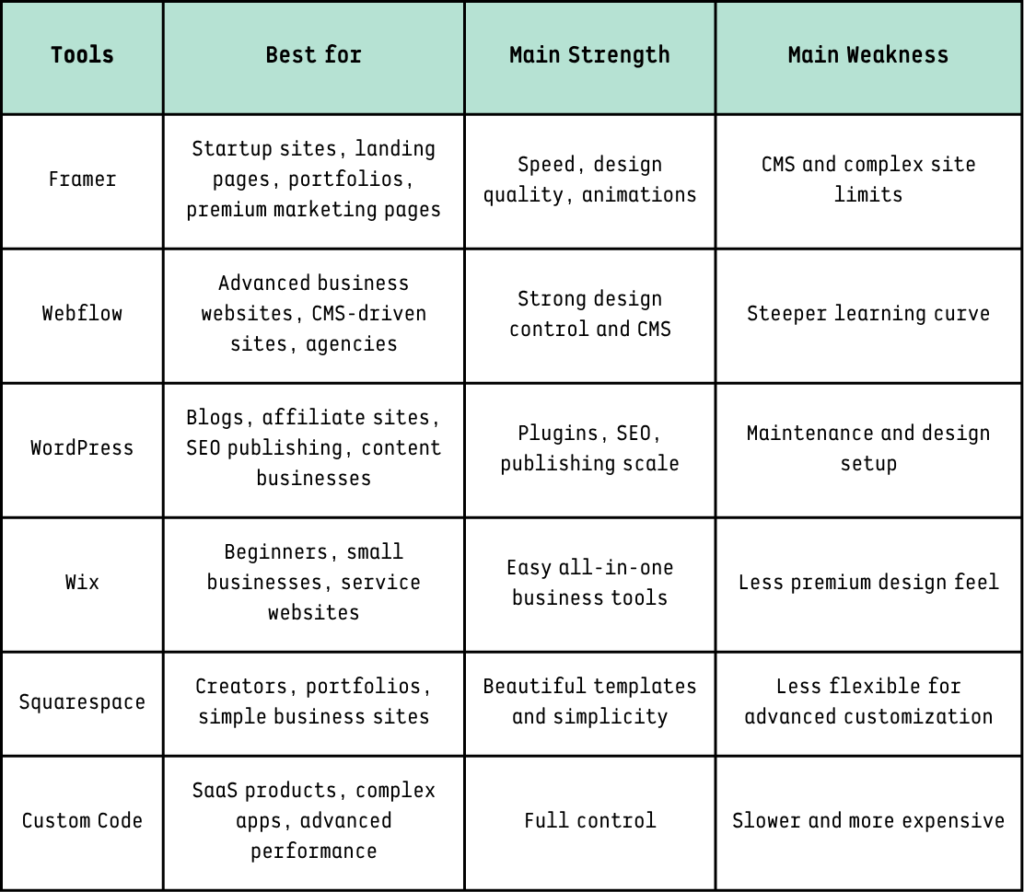
Framer Comparison Table
Who Should Use Framer?
Framer is a strong choice for:
1. Startup Founders
If you need a landing page, waitlist page, investor-facing website, or product launch page, Framer is one of the best tools available.
You can test an idea quickly without hiring a full development team.
2. Designers
Framer is excellent for designers who want to move beyond static mockups and ship real websites.
It gives designers more ownership over the final product.
3. Agencies
Agencies can use Framer to build polished websites faster for clients, especially if the client needs a modern marketing site rather than a complex backend platform.
4. SaaS Companies
Framer is great for SaaS websites because SaaS brands often need:
- Product pages
- Pricing pages
- Feature pages
- Comparison pages
- Demo booking pages
- Changelog pages
- Blog pages
- Conversion-focused landing pages
5. Affiliate Marketers
Framer can be useful for affiliate marketers who want to create premium landing pages for campaigns.
Example:
- “Best AI Tools for Freelancers” landing page
- “VPN Comparison” landing page
- “Best Website Builders for Startups” page
- “Free AI Tools Directory” page
- “Side Hustle Tool Kit” page
But for a full affiliate blog with hundreds of posts, WordPress may still be better.
Who Should Avoid Framer?
Framer may not be the best fit if you need:
- A massive blog with hundreds or thousands of posts
- Advanced CMS relationships
- Complex e-commerce
- Membership portals
- Marketplace features
- User dashboards
- Deep backend logic
- Heavy plugin ecosystem
- Full ownership of code infrastructure
- Very low-cost hosting for many small sites
Framer is powerful, but it is not meant to replace every web development stack.
The Business Case: Why Framer Matters
The real value of Framer is not just that it builds websites.
The value is that it reduces the distance between idea and market test.
That is the part entrepreneurs should care about.
A founder can use Framer to test a product idea.
A freelancer can use Framer to build client landing pages.
A creator can use Framer to launch a personal brand.
A SaaS team can use Framer to test pricing pages.
An affiliate marketer can use Framer to build conversion-focused campaigns.
An agency can use Framer to ship client work faster.
In business, speed creates feedback.
Feedback creates improvement.
Improvement creates revenue.
That is why Framer is worth watching.
Best Use Cases for Framer
Best Framer Use Case #1: SaaS Landing Page
A SaaS founder can build a homepage, pricing section, feature cards, testimonials, FAQ, and call-to-action page quickly.
CTA Example:
Start your free trial.
Book a demo.
Join the waitlist.
Get early access.
Best Framer Use Case #2: Affiliate Landing Page
An affiliate marketer can build a clean comparison page for tools like VPNs, AI writing platforms, hosting companies, website builders, or productivity apps.
CTA Example:
Compare the best tools.
Try our recommended platform.
Claim the current deal.
Best Framer Use Case #3: Creator Portfolio
A designer, developer, consultant, or freelancer can use Framer to showcase work, testimonials, case studies, and service packages.
CTA Example:
Book a discovery call.
View portfolio.
Request a quote.
Best Framer Use Case #4: Product Launch Page
If you are launching an app, digital product, newsletter, or course, Framer can help create a polished launch page fast.
CTA Example:
Join the launch list.
Download the free guide.
Pre-order now.
Framer Pros and Cons
Pros
- Beautiful modern design
- Fast publishing
- Great animations
- Strong Figma-style workflow
- Good for landing pages
- Built-in hosting
- Built-in SEO features
- Real-time collaboration
- Good for designers
- Good for startups
- Reduces developer dependency
Cons
- CMS can feel limited
- Pricing can add up across multiple sites
- Not ideal for complex content systems
- Learning curve for beginners
- Less flexible than custom code
- Not always best for large affiliate blogs
- Some advanced features may require workarounds
Final Verdict: Is Framer Worth It?
Yes, Framer is worth it — but only for the right type of website.
Framer is worth it if you want a fast, polished, modern website without spending weeks on development. It is one of the best tools for startup landing pages, SaaS websites, creator portfolios, product pages, and premium marketing websites.
But Framer is not the best choice for every business.
If you are building a large content site, affiliate blog, complex CMS platform, or advanced e-commerce system, you may be better served by WordPress, Webflow, Shopify, or custom development.
Aqyreon Recommendation
Use Framer when speed and design matter most.
Use Webflow when CMS structure and advanced visual control matter more.
Use WordPress when SEO publishing and affiliate content scale matter most.
Use Wix or Squarespace when simplicity matters more than customization.
Use custom code when your website is really a product, not just a marketing site.
Framer’s strongest value is this:
It helps small teams look bigger, move faster, and launch better websites without waiting on developers.
For founders, creators, agencies, and modern brands, that can be worth the price.