

Best AI Tools for Beginners in 2026: The Simple Stack to Save Time, Create Faster, and Start Making Money Online
AI is no longer something only software engineers, tech founders, or large companies use.
In 2026, regular people are using AI to write emails, create social media posts, design graphics, edit videos, summarize documents, build resumes, research faster, organize projects, and even launch side hustles.
But there is one major problem.
Most beginners get overwhelmed.
They open YouTube, TikTok, or X and see people recommending 30 different AI tools. One tool writes. Another designs. Another edits video. Another builds websites. Another promises to automate your entire business.
Before long, the beginner is not more productive.
They are confused.
At Aqyreon, we look at AI differently. The best AI tool is not always the most advanced one. The best AI tool for a beginner is the one that helps you get a real result quickly.
That is what this guide is about.
Not hype.
Not complicated tech language.
Not a list of tools you will never use.
This is a simple beginner-friendly AI tool stack you can use to work faster, create better content, stay organized, and possibly build your first online income stream.
Quick List: Best AI Tools for Beginners in 2026
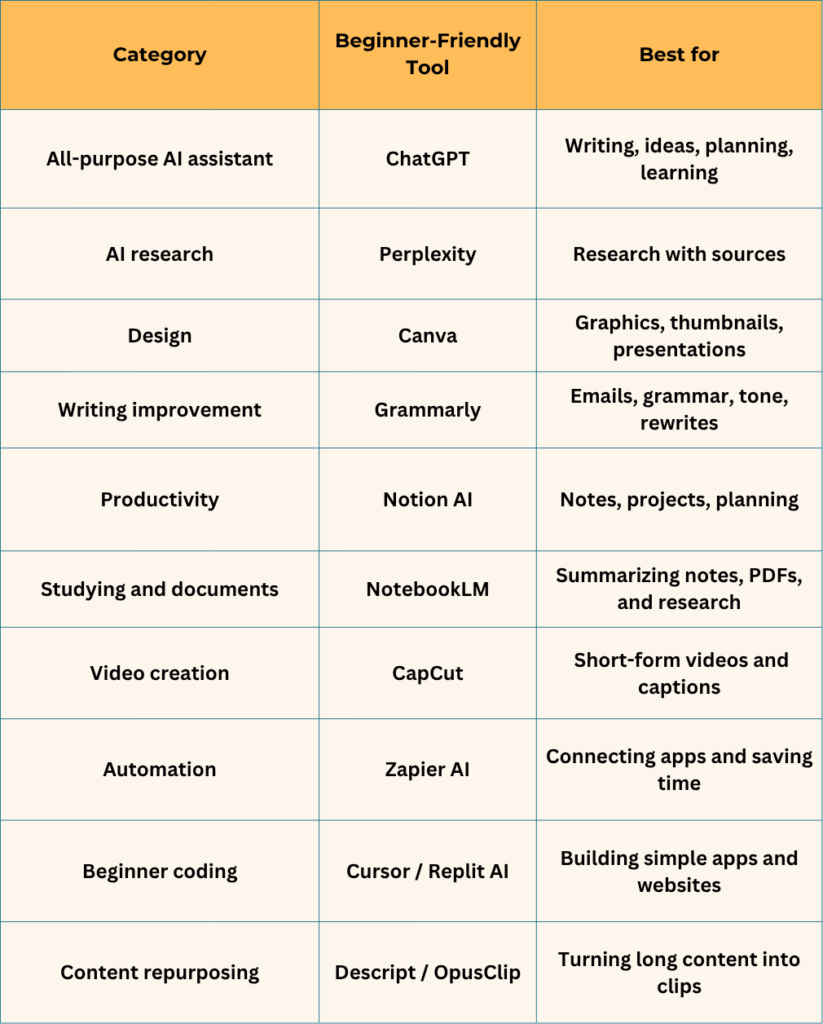
1. ChatGPT — Best Overall AI Tool for Beginners
If you are completely new to AI, start with ChatGPT.
The reason is simple: it feels like having a smart assistant you can talk to. You do not need to understand code. You do not need to know technical terms. You just ask questions, explain what you need, and refine the answer.
You can use ChatGPT to write, brainstorm, summarize, plan, rewrite, explain, organize, and create.
For beginners, that matters because the first goal is not to become an AI expert. The first goal is to stop staring at a blank page.
Best for
ChatGPT is best for:
- Writing blog outlines
- Drafting emails
- Brainstorming business ideas
- Explaining difficult topics
- Creating social media captions
- Planning a side hustle
- Summarizing long content
- Writing product descriptions
- Creating checklists and templates
- Turning rough ideas into organized content
Beginner example
Let’s say you want to start a blog about personal finance, AI tools, or cybersecurity.
Instead of asking, “What should I write?” and getting stuck, you can ask ChatGPT:
Give me 20 beginner-friendly blog post ideas about AI tools people can use to save time and make money online.
Then you can ask:
Turn idea number 4 into a blog outline with H2 headings, affiliate CTA sections, and image prompt ideas.
That is where ChatGPT becomes powerful. It helps you move from idea to execution.
Aqyreon money angle
ChatGPT can help beginners create digital assets such as:
- Ebooks
- Blog posts
- Email newsletters
- Online course outlines
- Lead magnets
- Freelance service packages
- Resume templates
- YouTube scripts
- Social media content calendars
This does not mean ChatGPT will magically make you rich. But it can help you produce faster, learn faster, and package your knowledge into something valuable.
Want to turn AI into a real side hustle? Start by using ChatGPT to generate ideas, Canva to design your content, Notion to organize your workflow, and a website host to publish your work online.
2.Perplexity— Best AI Tool for Research
ChatGPT is great for brainstorming and writing, but when you need research, sources, and current information, Perplexity is a strong beginner-friendly tool.
Think of Perplexity as an AI search assistant. Instead of only giving you a list of links, it helps summarize information and point you toward sources.
That makes it useful for bloggers, students, YouTubers, creators, freelancers, and anyone who wants to create content that is more accurate and informed.
Best for
Perplexity is best for:
- Researching blog topics
- Finding sources
- Comparing tools
- Understanding industry trends
- Validating content ideas
- Gathering statistics
- Creating research-backed outlines
Beginner example
Imagine you want to write a blog post about the best AI tools for real estate agents.
You can use Perplexity to research:
- Popular AI tools in real estate
- Current market trends
- Use cases for agents
- Productivity statistics
- Competitor tools
- Common customer problems
Then you can bring that research into ChatGPT and turn it into a blog post, YouTube script, LinkedIn post, or email newsletter.
Aqyreon money angle
If you are building a blog, newsletter, YouTube channel, or affiliate site, research matters. Weak content usually sounds generic because the creator did not research deeply enough.
Perplexity helps beginners avoid that mistake.
Use it before writing so your content has stronger examples, better structure, and more credibility.
3. Canva — Best AI Design Tool for Beginners
Good content needs good visuals.
That does not mean you need to become a professional designer. It means you need a simple tool that helps you create clean graphics quickly.
That is where Canva comes in.
Canva is one of the easiest design platforms for beginners because it gives you templates, drag-and-drop editing, brand kits, social media formats, presentation layouts, and AI-powered creative tools.
Best for
Canva is best for:
- Blog hero images
- YouTube thumbnails
- Pinterest pins
- Instagram posts
- Facebook graphics
- Ebook covers
- Lead magnets
- Presentations
- Flyers
- Social media carousels
- Affiliate comparison graphics
Beginner example
Let’s say you write a blog post titled:
Best AI Tools for Beginners in 2026
With Canva, you can create:
- A featured image for your blog
- A Pinterest pin
- A YouTube thumbnail
- A LinkedIn carousel
- An ebook cover
- A lead magnet checklist
That means one article can become multiple pieces of content.
Aqyreon money angle
Canva is one of the most useful tools for digital product beginners.
You can use it to create:
- Printable planners
- Social media templates
- Resume templates
- Business cards
- Media kits
- Ebook layouts
- Checklists
- Worksheets
- Course slides
If you want to sell simple digital products, Canva is one of the easiest tools to start with.
4. Grammarly — Best AI Tool for Cleaner Writing
AI can help you write faster, but your writing still needs to sound clear, professional, and trustworthy.
That is why Grammarly is useful.
For beginners, Grammarly acts like a writing assistant that helps catch grammar mistakes, improve tone, rewrite awkward sentences, and make your message easier to understand.
This is especially important if you write emails, blog posts, resumes, LinkedIn posts, client proposals, or product reviews.
Best for
Grammarly is best for:
- Emails
- Blog posts
- Resumes
- LinkedIn posts
- Business proposals
- Social media captions
- Product reviews
- Newsletters
- Professional communication
Beginner example
You can draft something quickly with ChatGPT, then use Grammarly to polish it.
For example:
ChatGPT helps you create the first version of a blog post.
Grammarly helps clean the tone, grammar, and readability.
That combination is powerful because speed alone is not enough. Your content also needs to sound human and credible.
Aqyreon money angle
If you want to freelance, start a blog, apply for jobs, create product reviews, or build a personal brand, your writing quality matters.
Grammarly helps beginners look more professional before they hit publish, send, or apply.
5. Notion AI — Best AI Productivity Tool for Beginners
One of the biggest mistakes beginners make with AI is creating too many ideas and not organizing them.
You generate blog ideas.
You create business plans.
You draft social posts.
You save tool recommendations.
You collect research.
Then everything gets scattered across Google Docs, notes apps, screenshots, and random bookmarks.
Notion helps solve that.
Notion is a workspace where you can organize notes, projects, tasks, content calendars, databases, and plans. With AI features, it can also help summarize, rewrite, brainstorm, and organize information faster.
Best for
Notion AI is best for:
- Content planning
- Project management
- Side hustle tracking
- Notes
- Task lists
- Client work
- Research storage
- Weekly planning
- SOPs
- Personal knowledge bases
Beginner example
If you are starting a blog, you can use Notion to create a dashboard with:
- Blog post ideas
- Target keywords
- Affiliate products
- Publishing calendar
- YouTube script ideas
- Social media captions
- Email newsletter drafts
- Income tracker
- Content status board
Now your AI workflow becomes more organized.
Aqyreon money angle
Notion is valuable because it turns AI output into a system.
And systems are what help people stay consistent.
If your goal is to build a blog, YouTube channel, freelance business, or digital product brand, Notion can become your command center.
6. Google NotebookLM — Best AI Tool for Studying and Understanding Documents
NotebookLM is one of the most useful tools for students, researchers, writers, and content creators who work with documents.
Instead of asking AI random questions, you can use it to help understand your own materials.
That could include:
- PDFs
- Class notes
- Reports
- Research documents
- Meeting notes
- Long articles
- Training materials
Best for
NotebookLM is best for:
- Summarizing PDFs
- Studying class notes
- Understanding long documents
- Creating study guides
- Pulling key points from research
- Preparing for presentations
- Organizing source material
Beginner example
Let’s say you download a long report about cybersecurity trends.
Instead of reading the entire report line by line, you can use NotebookLM to help extract:
- Main points
- Important statistics
- Key risks
- Business takeaways
- Summary notes
- Possible blog post angles
Aqyreon money angle
If you create educational content, review software, write research-based articles, or make explainer videos, NotebookLM can help you turn complicated information into understandable content.
That is valuable because the internet does not need more copied information.
It needs better explanation.
7. CapCut — Best Beginner AI Tool for Short-Form Video
Short-form video is one of the fastest ways to get attention online.
But many beginners avoid video because they think editing is too difficult.
CapCut makes video editing easier, especially for TikTok, YouTube Shorts, Instagram Reels, and Facebook Reels.
It includes tools for captions, templates, trimming, effects, text overlays, background removal, voiceovers, and short-form editing.
Best for
CapCut is best for:
- YouTube Shorts
- TikTok videos
- Instagram Reels
- Facebook Reels
- Faceless videos
- Product promos
- Captioned videos
- Short educational clips
- Affiliate marketing videos
Beginner example
You can take one blog post and turn it into five short videos.
For example, from this article, you could create Shorts like:
- “5 AI Tools Every Beginner Should Know”
- “The Best AI Tool Stack for Side Hustlers”
- “How to Use AI to Start a Blog”
- “Best AI Tools for Content Creators”
- “Stop Using Too Many AI Tools”
Aqyreon money angle
CapCut helps beginners repurpose content.
And repurposing matters because one article should not only stay on your blog. It should become videos, pins, posts, carousels, and emails.
That is how small creators build reach without creating from scratch every day.
8. Zapier AI — Best Beginner Tool for Automation
At some point, beginners realize that creating content is only part of the work.
There are also repetitive tasks:
- Saving leads
- Sending emails
- Moving files
- Updating spreadsheets
- Posting notifications
- Managing forms
- Organizing customer information
Zapier helps connect apps so these tasks can happen automatically.
You do not need to be a developer. You create simple “if this happens, do that” workflows.
Best for
Zapier AI is best for:
- Small business automation
- Lead capture
- Email marketing workflows
- Content workflows
- Productivity
- Client onboarding
- Form automation
Beginner example
Imagine someone downloads your free AI checklist.
With automation, you can:
- Add their email to your newsletter list
- Send a welcome email
- Add their name to a spreadsheet
- Notify you that a new lead came in
That saves time and makes your business feel more professional.
Aqyreon money angle
Automation is not just for big companies.
A beginner with a blog, newsletter, freelance service, or digital product can use automation to look organized even before hiring a team.
9. Cursor or Replit AI — Best AI Coding Tools for Beginners
Not every beginner wants to code.
But if you have ever wanted to build a simple website, calculator, landing page, or small app, AI coding tools can help you move faster.
Cursor and Replit AI are useful because they can help explain code, generate code, fix errors, and guide you through simple development projects.
Best for
AI coding tools are best for:
- Simple websites
- Landing pages
- Calculators
- Beginner apps
- MVPs
- Form tools
- Basic coding practice
Beginner example
You could build simple web tools like:
- Blog title generator
- Side hustle income calculator
- Budget calculator
- Local service quote estimator
- AI prompt generator
- Affiliate disclosure generator
- Content repurposing tool
Aqyreon money angle
This is where AI becomes more than a productivity tool.
It becomes a building tool.
Instead of only writing content about tools, beginners can start creating their own simple tools that solve small problems.
That is a real opportunity.
10. Descript or OpusClip — Best AI Tools for Repurposing Content
One of the smartest content strategies for beginners is repurposing.
Do not create one piece of content and stop there.
Turn one long piece into many smaller pieces.
That is where tools like Descript and OpusClip can help. They are useful for turning longer videos, podcasts, interviews, webinars, or talking-head content into shorter clips, captions, transcripts, and social media assets.
Best for
These tools are best for:
- YouTubers
- Podcasters
- Coaches
- Bloggers
- Course creators
- Social media creators
- Small business owners
Beginner example
One YouTube video can become:
- 3 YouTube Shorts
- 2 Instagram Reels
- 1 TikTok video
- 1 LinkedIn post
- 1 X thread
- 1 newsletter
- 3 quote graphics
- 1 blog post
That is how creators build a content engine.
Aqyreon money angle
Beginners should not think like content creators only.
They should think like media operators.
A media operator takes one idea and distributes it across multiple platforms.
That is how AI becomes a growth tool.
The Best Beginner AI Stack for 2026
If you are completely new, do not start with ten tools.
Start with five.
The simple beginner stack
- ChatGPT — for ideas, writing, planning, and learning
- Perplexity — for research and sources
- Canva — for visuals and graphics
- Grammarly — for polishing writing
- CapCut — for short-form video
That stack is enough to start:
- A blog
- A YouTube channel
- A newsletter
- A freelance service
- A digital product
- An affiliate content business
- A personal brand
The goal is not to use every AI tool.
The goal is to build a simple workflow that helps you create faster and publish consistently.
Best AI Tools by Goal
If you want to start a blog
Use:
- ChatGPT
- Perplexity
- Grammarly
- Canva
- Notion
This gives you research, writing, organization, editing, and visuals.
If you want to make YouTube videos
Use:
- ChatGPT
- Canva
- CapCut
- Descript
- OpusClip
This helps you script, design thumbnails, edit videos, and repurpose clips.
If you want to start freelancing
Use:
- ChatGPT
- Grammarly
- Canva
- Notion
- Zapier
This helps with proposals, communication, client work, organization, and automation.
If you want to create digital products
Use:
- ChatGPT
- Canva
- Notion
- Grammarly
- Gumroad or Payhip
This helps you create, design, package, and sell simple products.
If you want to learn faster
Use:
- ChatGPT
- Perplexity
- NotebookLM
- Notion
This helps you research, summarize, study, and organize knowledge.
If you want to build simple apps
Use:
- ChatGPT
- Cursor
- Replit AI
- Canva
This helps you plan, code, debug, and design basic interfaces.
A Simple Beginner AI Workflow
Here is a realistic workflow beginners can use.
Step 1: Research with Perplexity
Ask:
What are the most useful beginner-friendly AI tools for content creators, freelancers, and small business owners in 2026?
Use this to understand the topic and gather ideas.
Step 2: Draft with ChatGPT
Ask:
Turn this research into a beginner-friendly blog outline with examples, headings, affiliate placement ideas, and a clear conclusion.
Now you have a structure.
Step 3: Organize in Notion
Save your:
- Keywords
- Article outline
- Draft
- Image ideas
- Affiliate links
- Publishing checklist
- Social media captions
Step 4: Polish with Grammarly
Before publishing, clean up grammar, clarity, tone, and sentence structure.
Step 5: Design with Canva
Create:
- Blog hero image
- Pinterest pin
- YouTube thumbnail
- Instagram post
- Lead magnet cover
Step 6: Repurpose with CapCut
Turn the article into short videos for:
- TikTok
- YouTube Shorts
- Instagram Reels
- Facebook Reels
This is how one idea becomes a full content system.
Final Verdict: What Is the Best AI Tool for Beginners in 2026?
The best AI tool for most beginners is ChatGPT.
Not because it does everything perfectly, but because it gives the fastest first win.
You can use it to write, plan, brainstorm, learn, summarize, organize, and create.
But the smartest beginner stack is:
ChatGPT + Perplexity + Canva + Grammarly + CapCut
That combination covers the five most important beginner needs:
- Thinking
- Research
- Writing
- Design
- Video
In 2026, beginners do not need to master every AI tool.
They need to master a simple system.
Start with one tool.
Build one useful workflow.
Use that workflow to create something valuable.
Then turn that value into a blog, service, digital product, YouTube channel, newsletter, or side hustle.
That is where the real opportunity is.
Stay engaged with aqyreon to get more AI and Tech insights.