
Best Password Managers to Use in 2026: Aqyreon Picks for Safer Logins, Teams, and Online Business
In 2026, your passwords are not just passwords anymore.
They are the keys to your bank accounts, email, business tools, cloud storage, social media, crypto wallets, client portals, AI tools, and team systems. One reused password can expose your entire digital life.
That is why password managers have become one of the most important cybersecurity tools for individuals, creators, families, freelancers, and businesses.
A password manager, also called a credential vault, helps you securely store passwords, generate stronger logins, autofill credentials, share access safely, store 2FA codes, manage passkeys, and reduce the risk of account takeover.
NIST, one of the most important cybersecurity standards bodies, says password managers are highly recommended because they help users create long, unique passwords and access them across devices. NIST also notes that the password manager itself should be protected with MFA because it controls access to all your stored credentials.
At Aqyreon, we do not just rank tools by popularity. We look at what the tool actually helps you do:
Does it protect your accounts?
Does it work across devices?
Is it good for beginners?
Can a business use it safely?
Does it support modern security like MFA, passkeys, secure sharing, and admin controls?
Can it help teams reduce password chaos?
Based on the information provided and current public product information, these are the Aqyreon picks for the best password managers to use in 2026.
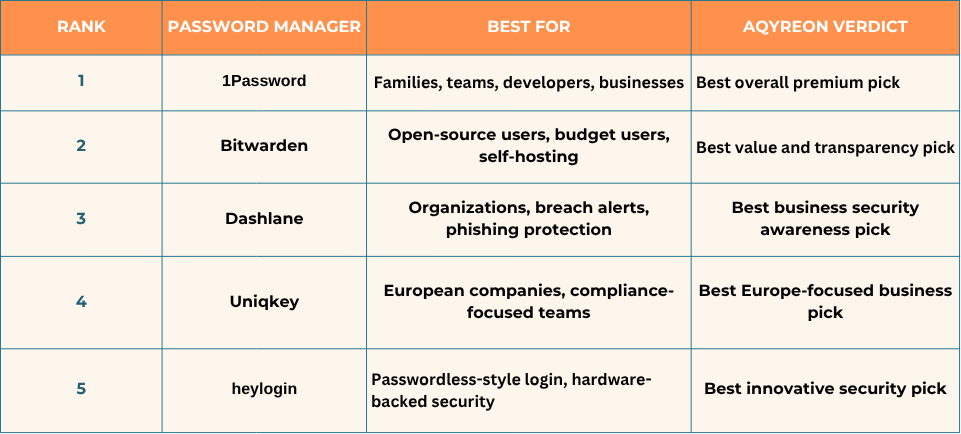
Aqyreon Quick Picks: Best Password Managers for 2026
1. 1Password — Best Overall Password Manager for Families, Teams, and Developers
Aqyreon Pick: Best overall premium password manager for 2026
Best for: Families, startups, remote teams, developers, business users, and people who want a polished experience
User-provided rating: 4.8 from 45 reviews
1Password is one of the strongest password managers to consider in 2026 because it is no longer just a place to store passwords. It has grown into a broader identity and access security platform.
It helps users store passwords, passkeys, secure notes, payment details, identities, documents, 2FA codes, and other sensitive information. 1Password also supports secure sharing, which is useful for families, business teams, contractors, and founders who need to share access without sending passwords through text messages, email, or Slack.
For businesses, 1Password now positions itself around securing passwords, passkeys, secrets, app access, and even access for AI agents. Its business platform focuses on visibility and control across humans, applications, and credentials.
Why Aqyreon Likes 1Password
1Password is a strong fit for users who want a polished, premium tool that works across personal and business use cases.
It is especially useful for:
Families sharing Netflix, banking, insurance, school, and household logins
Creators managing social media accounts, affiliate dashboards, and email tools
Startup teams sharing SaaS access
Developers storing secrets and sensitive project credentials
Businesses trying to reduce password reuse and shadow IT
1Password also gets strong marks from independent reviewers. WIRED praised 1Password for its zero-knowledge architecture, support for 2FA codes, passkeys, secure documents, identities, Watchtower security insights, and cross-platform usability.
Where 1Password May Not Be Perfect
The biggest downside is cost. 1Password is a premium product, and it does not have the same free-tier appeal as Bitwarden. Also, The Verge reported that 1Password increased pricing for individual and family plans starting March 27, 2026.
That does not make it a bad choice. It just means price-sensitive users may prefer Bitwarden.
Aqyreon Verdict
Choose 1Password if you want the best balance of usability, premium security features, team sharing, passkeys, and business-ready password management.
2. Bitwarden — Best Open-Source Password Manager for Value and Transparency
Aqyreon Pick: Best open-source and budget-friendly password manager
Best for: Privacy-conscious users, open-source supporters, small businesses, developers, and self-hosting users
User-provided rating: 4.8 from 16 reviews
Bitwarden is one of the most respected password managers because it is open source, affordable, and flexible.
For many users, Bitwarden’s biggest advantage is transparency. The company says its source code is public, allowing security researchers, third-party auditors, and the community to review it. That matters because trust is a major factor when choosing a tool that stores your most sensitive credentials.
Bitwarden also offers password and passkey management for individuals and organizations across browsers and devices.
Why Aqyreon Likes Bitwarden
Bitwarden is the best pick for people who want serious password protection without paying premium prices.
It is especially useful for:
Beginners who want a strong free option
Tech-savvy users who care about open-source transparency
Developers who want command-line and automation options
Small teams that need affordable password sharing
Companies that want self-hosting options
Bitwarden also supports self-hosting, allowing organizations to run Bitwarden on their own infrastructure and apply their own security controls behind firewalls, proxies, or internal policies.
WIRED has also highlighted Bitwarden’s open-source approach, cross-platform support, passkey support, and low-cost premium features.
Where Bitwarden May Not Be Perfect
Bitwarden may feel less polished than 1Password for users who want a more premium interface. Some business teams may also prefer 1Password or Dashlane if they want a more guided admin experience.
But for value, transparency, and flexibility, Bitwarden is hard to beat.
Aqyreon Verdict
Choose Bitwarden if you want the best mix of affordability, open-source trust, strong security, and self-hosting flexibility.
3. Dashlane — Best Password Manager for Business Security Awareness
Aqyreon Pick: Best for organizations that want breach monitoring and phishing-aware protection
Best for: Businesses, teams, employees, and security-conscious organizations
User-provided rating: 4.6 from 5 reviews
Dashlane is a strong password manager for organizations because it focuses heavily on preventing credential-related breaches.
Dashlane describes its platform as a credential security solution designed to help enterprises reduce risky employee passwords, which remain one of the biggest causes of security incidents.
One of Dashlane’s standout features is its security alerts. Dashlane can alert users when account data may be at risk, including breach-related alerts and other security notifications depending on the plan.
Dashlane also offers phishing alerts. Its support documentation explains that Dashlane can warn users about fake Dashlane websites and can also provide vault phishing alerts when users paste or autofill stored login information into potentially risky sites or apps.
Why Aqyreon Likes Dashlane
Dashlane is not just about storing passwords. It is built around helping people and organizations understand password risk.
That makes it useful for:
Businesses with employees who reuse passwords
Teams that need admin policies
Organizations that want breach monitoring
Companies trying to reduce phishing risk
Managers who want better visibility into password behavior
Dashlane’s breach monitoring can help users see which accounts are affected by a breach and which passwords may need to be changed.
Where Dashlane May Not Be Perfect
Dashlane may not be the cheapest option, and some individuals may not need all of its business-focused features. If you only need a simple personal password manager, Bitwarden may be more cost-effective.
Aqyreon Verdict
Choose Dashlane if your priority is business password security, breach alerts, phishing awareness, and admin-level protection.
4. Uniqkey — Best Europe-Focused Password and Access Management Platform
Aqyreon Pick: Best for European companies and compliance-focused teams
Best for: European businesses, regulated teams, compliance-focused organizations, SaaS-heavy companies
User-provided rating: 4.9 from 14 reviews
Uniqkey is a password and access management platform built with European businesses in mind.
The company describes itself as a Europe-based password and access management solution for businesses subject to strict EU data security standards. Uniqkey emphasizes zero-knowledge, end-to-end encryption, European hosting, data integrity, and ISO 27001 certification.
That positioning matters because many businesses do not just need password storage. They need access control, compliance, data residency awareness, employee login oversight, and a way to reduce weak or reused passwords across the company.
Why Aqyreon Likes Uniqkey
Uniqkey stands out because it is not trying to be a generic consumer password manager. It is clearly positioned for business access management.
It is especially useful for:
European companies
Compliance-focused teams
Businesses using many cloud and SaaS apps
Organizations that want 2FA autofill
IT teams that need centralized access visibility
Companies concerned about weak and reused employee passwords
Uniqkey’s Chrome Web Store listing says the platform combines password management, 2FA autofill, and centralized access management for IT admins.
Where Uniqkey May Not Be Perfect
Uniqkey may be less familiar to U.S. consumers compared with 1Password, Bitwarden, and Dashlane. It also appears more business-focused, so it may not be the first choice for someone who simply wants a personal password manager.
Aqyreon Verdict
Choose Uniqkey if you are a European business or compliance-focused company that wants password management, access control, 2FA workflows, and EU-centered security positioning.
5. heylogin — Best Innovative Password Manager for Hardware-Based Security
Aqyreon Pick: Best innovative passwordless-style password manager
Best for: Users and businesses that want hardware-backed login confirmation and a different approach from traditional master passwords
User-provided rating: 5.0 from 2 reviews
heylogin takes a different approach from traditional password managers.
Instead of focusing on a master password experience, heylogin describes itself as a password manager without a master password. It uses hardware-based end-to-end encryption, is 2-factor secure by default, and is developed and hosted in Germany.
That makes heylogin interesting for users who want a more modern login experience, where smartphone confirmation plays a major role.
Why Aqyreon Likes heylogin
heylogin is worth watching because the password management industry is moving toward passkeys, biometrics, device-based authentication, and passwordless-style workflows.
It is especially useful for:
Users who dislike master passwords
Teams that want secure login confirmation
Businesses interested in German-hosted security tools
People who prefer phone-based login approval
Organizations exploring passwordless-style access
heylogin’s Chrome Web Store listing says users can confirm logins with their phone using PIN, fingerprint, or face unlock.
Gartner Peer Insights also describes heylogin as a password manager with hardware-based end-to-end encryption, 2-factor security by default, and German hosting.
Where heylogin May Not Be Perfect
heylogin may not be as broadly recognized as 1Password or Bitwarden. Some users may also prefer a more traditional password manager with a master password, emergency access, and familiar vault workflows.
Aqyreon Verdict
Choose heylogin if you want a modern, hardware-backed password manager that moves closer to passwordless-style login security.
Aqyreon Comparison: Which Password Manager Should You Choose?
Best Overall: 1Password
Choose 1Password if you want the most polished all-around option for families, teams, creators, developers, and businesses.
Best Free or Budget Pick: Bitwarden
Choose Bitwarden if you want open-source transparency, affordability, cross-device support, and self-hosting flexibility.
Best for Business Risk Monitoring: Dashlane
Choose Dashlane if your company wants breach alerts, phishing-aware autofill, security alerts, and admin visibility.
Best for European Compliance: Uniqkey
Choose Uniqkey if your business is in Europe or cares about EU hosting, data sovereignty, compliance, and centralized access control.
Best Innovative Security Model: heylogin
Choose heylogin if you want a modern password manager built around hardware-backed encryption and phone-based confirmation.
What to Look for in a Password Manager in 2026
A good password manager should do more than save passwords.
Look for these features:
1. Strong encryption
Your vault should be encrypted so that only you can access your stored credentials.
2. MFA support
Because your password manager protects everything else, it should support multi-factor authentication. NIST specifically recommends protecting password managers with MFA.
3. Passkey support
Passkeys are becoming more important because they reduce reliance on traditional passwords. Recent guidance from the UK’s National Cyber Security Centre has described passkeys as a preferred authentication option where available.
4. Secure sharing
Never share passwords through email, text, or screenshots. Use a password manager that supports safe sharing.
5. Breach alerts
A good password manager should help you detect reused, weak, or exposed passwords.
6. Cross-device access
Your password manager should work on your phone, browser, laptop, and tablet.
7. Business controls
For teams, look for admin controls, employee onboarding/offboarding, access policies, and reporting.
Final Aqyreon Recommendation
For most people, 1Password is the best overall premium pick in 2026.
For users who want the best value and open-source transparency, Bitwarden is the smartest choice.
For organizations focused on employee password risk, phishing alerts, and breach monitoring, Dashlane is a strong business option.
For European companies that care about compliance and EU-centered access management, Uniqkey deserves attention.
For users who want a modern, hardware-backed, passwordless-style experience, heylogin is the most interesting innovation pick.
The big lesson is simple:
Your password manager is no longer just a convenience tool.
It is part of your cybersecurity foundation.
If you run a business, manage client accounts, publish content online, use affiliate dashboards, store financial logins, or work with a team, a password manager is one of the easiest security upgrades you can make in 2026.