
Ubiquiti UniFi Home Wi-Fi 7 Review: True Whole-Home Wi-Fi 7 Mesh Finally Arrives
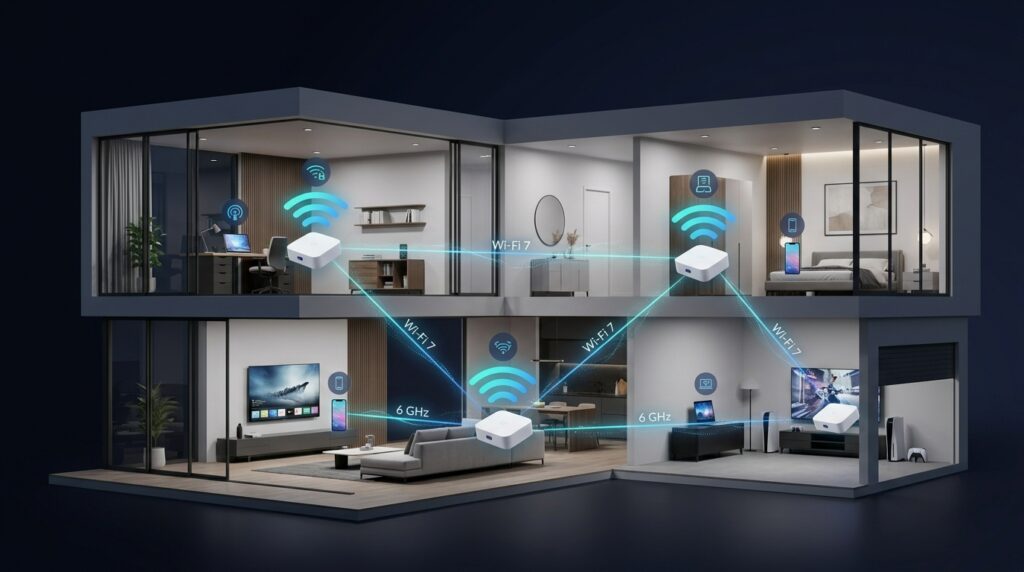
Ubiquiti is making a bigger push into the consumer home networking market with UniFi Home Wi-Fi 7, a new whole-home mesh system built around the company’s compact UniFi Express 7 (UX7).
The biggest upgrade is not simply Wi-Fi 7.
It is the introduction of STR MLO wireless backhaul, which allows compatible UniFi mesh units to communicate over the 5 GHz and 6 GHz bands simultaneously.
That could make UniFi Home Wi-Fi 7 one of the more interesting options for households that want strong wireless coverage without running Ethernet cables between every access point.
The system is available in several configurations:
- Single UniFi Express 7: $199.99
- UX7-2 two-pack: $379
- UX7-3 three-pack: $559
For larger homes, the three-unit UX7-3 package is positioned as Ubiquiti’s complete whole-home Wi-Fi solution.
What Makes UniFi Home Wi-Fi 7 Different?
The UniFi Express 7 was already capable of working as either a router or a mesh access point.
Previously, however, a wireless mesh connection generally depended on either the 5 GHz or 6 GHz band for communication between nodes.
With the latest STR MLO support, compatible UniFi Wi-Fi 7 devices can combine the 5 GHz and 6 GHz bands into a more powerful wireless connection between mesh units.
That is the key upgrade.
Instead of relying on a single wireless band to move traffic back toward the main router, the system can use multiple bands simultaneously.
The potential result is:
- Higher wireless throughput
- Better connection stability
- Lower latency
- More efficient use of Wi-Fi spectrum
- Better performance for devices connected to distant mesh nodes
For homes where Ethernet wiring is difficult or impossible, this could be a significant improvement.
What Is STR MLO?
MLO stands for Multi-Link Operation, one of the most important technologies introduced with Wi-Fi 7.
Traditional Wi-Fi devices typically connect through one frequency band at a time.
MLO allows compatible devices to communicate across multiple Wi-Fi bands.
There are different implementations of the technology.
MLSR MLO
Multi-Link Single-Radio, or MLSR, allows a device to switch intelligently between Wi-Fi bands such as:
- 2.4 GHz
- 5 GHz
- 6 GHz
An enhanced version known as eMLSR can monitor multiple bands and quickly select the best connection.
This can help reduce latency and improve reliability, but it does not necessarily increase maximum throughput because the device is still primarily communicating over one radio at a time.
STR MLO
Simultaneous Transmit and Receive Multi-Link Operation, or STR MLO, goes further.
Compatible devices can actively use multiple frequency bands at the same time.
For example, a UniFi mesh node could use both:
5 GHz + 6 GHz
to communicate with the main router.
This gives the wireless backhaul more available bandwidth and potentially makes the connection much more resilient.
STR MLO is particularly useful for devices with permanent power sources, including:
- Mesh access points
- Wireless bridges
- Routers
- Enterprise access points
Because the technology requires additional radios and power, it is less common in battery-powered devices.
Why Wireless Backhaul Matters
Every mesh Wi-Fi system needs a way for its secondary access points to communicate with the main router.
That connection is known as the backhaul.
The connection between the access point and your phones, laptops, televisions and smart-home devices is known as the fronthaul.
Imagine a mesh access point in an upstairs bedroom.
Your laptop connects to that access point through the fronthaul.
The access point then sends your internet traffic back to the primary router using its backhaul connection.
The quality of that backhaul can determine the performance of every device connected to the mesh node.
The Problem With Traditional Wireless Mesh Systems
Many wireless mesh networks use one Wi-Fi band for both client traffic and communication between mesh nodes.
That creates a major limitation.
When the same wireless band is used for both backhaul and fronthaul traffic, available bandwidth may need to be divided between the two jobs.
Some premium tri-band mesh systems solve this by dedicating one entire Wi-Fi band to backhaul.
However, that removes the band from normal client use.
Wi-Fi 7’s MLO technology provides another approach.
Instead of dedicating one frequency band exclusively to backhaul, compatible hardware can combine multiple bands into one connection.
That allows the network to use available Wi-Fi spectrum more efficiently.
Wired Backhaul Is Still Better
STR MLO makes wireless mesh significantly more capable, but Ethernet remains the preferred option whenever it is practical.
A wired connection between mesh access points usually provides:
- More consistent throughput
- Lower latency
- Less wireless interference
- Greater reliability
- Better performance under heavy network traffic
The UniFi Express 7 also includes wired networking support, making it possible to create a wired UniFi mesh system.
However, there is an important limitation.
Each UX7 only includes two Ethernet ports, and only one supports speeds up to 10Gbps.
That may be enough for typical households, but networking enthusiasts with multiple wired devices may need to add a UniFi switch.
UniFi Home Wi-Fi 7 Performance
The strongest reason to consider the UX7 mesh system is its combination of Wi-Fi 7 and STR MLO backhaul.
Using 5 GHz and 6 GHz simultaneously can provide substantially more wireless capacity than traditional single-band mesh links.
This becomes particularly useful in larger homes where satellite units are several rooms away from the primary router.
The system should also perform especially well when serving Wi-Fi 7 devices capable of taking advantage of newer wireless technologies.
Still, Wi-Fi performance depends heavily on factors such as:
- Wall construction
- Distance between access points
- Wireless interference
- Router placement
- Number of connected devices
- Client Wi-Fi capabilities
STR MLO improves the connection between UniFi mesh nodes, but it cannot eliminate the laws of radio physics.
UniFi’s Biggest Advantage: Flexibility
Ubiquiti’s biggest advantage over many consumer mesh systems is not hardware alone.
It is the UniFi ecosystem.
Users can manage networking through UniFi Network while also expanding into other Ubiquiti products.
The ecosystem includes:
UniFi Network
Routers, switches, wireless access points and network management.
UniFi Protect
Security cameras, doorbells and surveillance equipment.
UniFi Drive
Network-attached storage and related storage products.
This makes UniFi Home Wi-Fi 7 particularly attractive for people who want to start with a simple mesh network but eventually build a more advanced home infrastructure.
For example, a homeowner could start with three UX7 units and later add:
- UniFi switches
- Additional Wi-Fi 7 access points
- Security cameras
- Network storage
- Ethernet backhaul
- Additional network segmentation
Everything can remain within the same UniFi management environment.
You Don’t Have to Use Identical Access Points
Another major advantage is hardware flexibility.
The UX7 can work alongside other compatible tri-band UniFi Wi-Fi 7 access points.
That means users are not necessarily locked into buying identical mesh nodes throughout the house.
A smaller UX7 could serve one part of the property while a more powerful UniFi access point serves another.
This gives homeowners considerably more flexibility than many traditional consumer mesh systems.
Compact and Fanless Design
The UniFi Express 7 is also relatively small.
Its fanless design eliminates fan noise, making it suitable for living rooms, offices, bedrooms and other visible areas of a home.
Ubiquiti has also maintained the minimal design language common across many UniFi products.
For users who dislike oversized gaming-style routers with large antennas, the UX7 offers a much cleaner appearance.
Where UniFi Home Wi-Fi 7 Falls Short
The system has some important limitations.
Only Two Ethernet Ports
Each UX7 offers limited wired connectivity.
Users with gaming PCs, televisions, network storage devices or other Ethernet equipment may need a separate switch.
Only One 10Gbps Port
Although having 10Gbps connectivity is impressive for such a small device, additional Multi-Gig ports would make the system considerably more flexible.
No PoE
Power over Ethernet is not supported.
That limits some deployment options compared with traditional UniFi access points designed to receive both power and data over Ethernet.
No 2.4 GHz STR MLO Backhaul
The STR MLO mesh connection combines the faster 5 GHz and 6 GHz bands, rather than all three available Wi-Fi bands.
No AFC
The system does not currently offer Automated Frequency Coordination support.
AFC can allow compatible Wi-Fi 6E and Wi-Fi 7 equipment to use higher transmission power on certain parts of the 6 GHz spectrum where regulations permit it.
Not Designed for Wall Mounting
Its physical design works better sitting on furniture or another flat surface.
Users building more permanent ceiling- or wall-mounted networks may prefer dedicated UniFi access points.
UniFi Home Wi-Fi 7 Pros
The biggest strengths include:
- Powerful STR MLO wireless backhaul
- Wi-Fi 7 connectivity
- Excellent UniFi ecosystem integration
- Flexible mesh configurations
- Support for mixed compatible UniFi hardware
- Compact fanless design
- Strong network-management capabilities
- Optional mobile management
- Competitive pricing compared with some premium Wi-Fi 7 mesh systems
- Ability to transition to wired backhaul later
UniFi Home Wi-Fi 7 Cons
Potential disadvantages include:
- Only two Ethernet ports per unit
- Only one 10Gbps Ethernet port
- No Power over Ethernet
- No dedicated access-point mode for the complete mesh system
- 2.4 GHz is not included in the STR MLO backhaul
- No AFC support
- Limited mounting options
- Wi-Fi specifications are not the highest available in the Wi-Fi 7 market
Who Should Buy UniFi Home Wi-Fi 7?
The system makes the most sense for homeowners who want something more capable than a traditional plug-and-play consumer mesh network.
It could be particularly attractive if you:
- Own a medium or large home
- Cannot easily run Ethernet cables
- Want Wi-Fi 7
- Have fast fiber internet
- Need multiple wireless access points
- Want more advanced networking controls
- Plan to add security cameras or other UniFi hardware later
The UX7-3 could also be a practical entry point into the broader UniFi ecosystem without requiring a separate router, controller and multiple enterprise-style access points.
Who Should Skip It?
The system may be excessive if your home is relatively small or your internet connection is below a few hundred megabits per second.
Many Wi-Fi 6 and Wi-Fi 6E mesh systems remain perfectly capable for those environments.
It may also be less attractive if you simply want a system that requires almost no network configuration.
UniFi has become significantly easier to use, but it still offers far more networking controls than typical consumer mesh products.
That flexibility is useful for enthusiasts but potentially unnecessary for users who just want basic Wi-Fi.
Aqyreon Take
The most important part of Ubiquiti’s UniFi Home Wi-Fi 7 announcement isn’t the words Wi-Fi 7 on the box.
It is the arrival of STR MLO backhaul.
Mesh systems have always faced a fundamental problem: secondary access points need a fast connection back to the main router.
Ethernet solves that problem beautifully, but wiring an entire home isn’t always practical.
Combining 5 GHz and 6 GHz into a simultaneous Wi-Fi 7 backhaul gives Ubiquiti another way to address that bottleneck.
Add UniFi’s flexible network management and extensive hardware ecosystem, and the UX7 becomes much more than another consumer mesh router.
It can serve as the starting point for a network that grows with your home.
At $379 for two units and $559 for three, UniFi Home Wi-Fi 7 isn’t inexpensive, but it sits in a reasonable position compared with many premium Wi-Fi 7 mesh systems.
For buyers who want simple whole-home coverage today while keeping the option to build a more advanced UniFi network tomorrow, the UX7-3 could be one of Ubiquiti’s most compelling home-networking products yet.
Aqyreon Rating
Overall: 8.6/10
Performance: 8/10
Features: 9.5/10
Design & Ease of Use: 8.5/10
Value: 8.5/10
The Bottom Line
Ubiquiti has finally turned the UniFi Express 7 into something many home users have been waiting for: a genuine whole-home UniFi mesh system.
The combination of Wi-Fi 7, STR MLO backhaul and UniFi’s expandable ecosystem gives it an advantage that goes beyond raw wireless speed.
For users who cannot install Ethernet but still want a powerful, flexible and expandable home network, UniFi Home Wi-Fi 7 deserves serious consideration.