Lenovo Yoga 7A 2-in-1 16 Review: A Big OLED Laptop for Creators, Students, and Everyday Power Users
The Lenovo Yoga 7A 2-in-1 16 is built for people who want a premium-looking laptop without jumping into ultra-expensive workstation territory.
It is not trying to be a gaming machine.
It is not trying to replace a full creator workstation.
It is not built for people rendering heavy video projects all day.
Instead, this laptop is for students, creators, freelancers, remote workers, business owners, and everyday users who want one thing above everything else:
a big, beautiful OLED screen that makes work, content, and entertainment feel premium.
At around $1,700 as tested, or roughly $1,450 when discounted, the Yoga 7A 16 sits in an interesting place. It feels more premium than a basic student laptop, but it is still more approachable than many high-end creator machines.
The question is simple:
Is this the right big-screen OLED laptop for everyday users?
Let’s break it down.
Quick Verdict
The Lenovo Yoga 7A 2-in-1 16 is a strong choice if you want a large OLED touchscreen laptop for productivity, school, writing, design work, streaming, and light content creation.
Its biggest strengths are the 16-inch OLED display, long battery life, flexible 360-degree hinge, and excellent webcam.
Its biggest weakness is also clear: there is no discrete GPU, which means serious gaming, advanced video editing, and heavy graphics work are not its strong areas.
Best for: students, creators, writers, freelancers, business users, remote workers, and casual editors.
Not ideal for: gamers, 3D designers, serious video editors, and anyone who needs strong GPU power.
Why the Display Is the Main Reason to Buy It
The display is the headline feature of the Lenovo Yoga 7A 16.
This laptop comes with a 16-inch OLED touchscreen, and that changes the entire experience. OLED screens are known for deep blacks, rich contrast, and vibrant colors. For anyone who edits photos, watches videos, creates digital content, or simply wants a more premium viewing experience, this screen is the biggest selling point.
According to the provided test details, the screen covers:
- 100% sRGB
- 100% P3
- 91% AdobeRGB
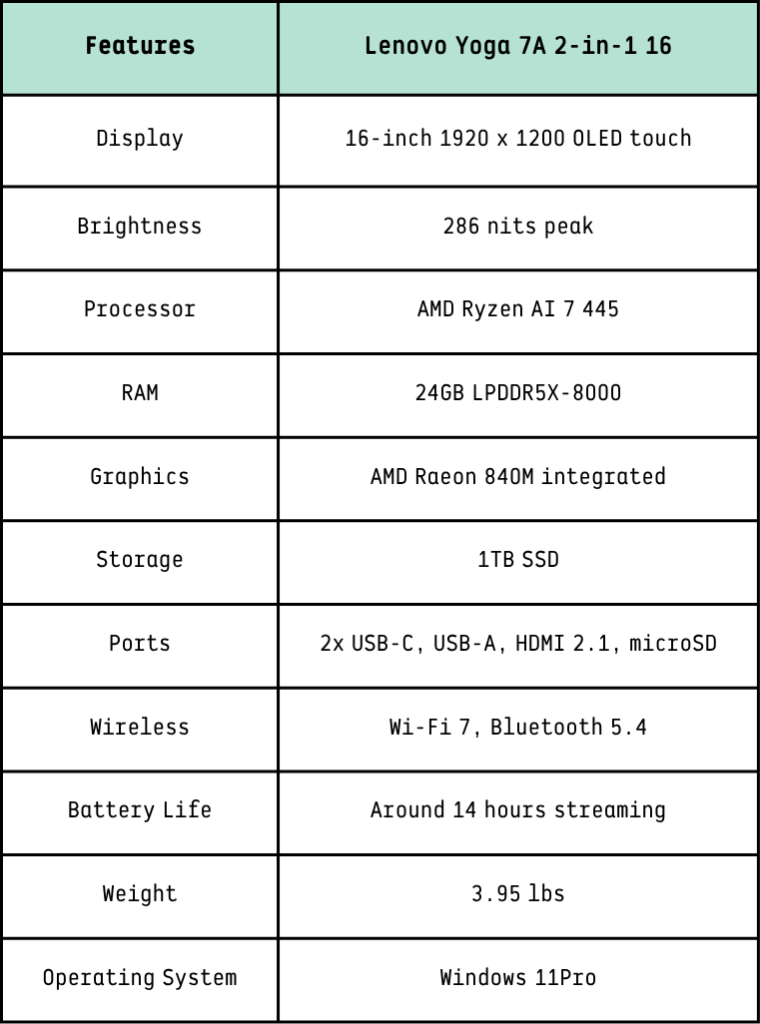
- 286 nits peak brightness
That means color accuracy is one of the strongest parts of this machine.
For creators, this matters. A strong color-accurate display helps when working on photos, graphics, thumbnails, presentations, website mockups, and social media visuals.
For students and professionals, it makes everyday tasks feel better too. Reading, writing, multitasking, and streaming all benefit from a larger, richer display.
But there is one limitation.
The Brightness Could Be Better
The screen is beautiful, but it is not extremely bright.
At 286 nits peak brightness, this laptop is fine for most indoor use. In a bedroom, office, classroom, coffee shop, or home workspace, it should look good.
But in a sunny room, outdoors, or near strong window light, you may notice the brightness limit.
This is not the laptop to buy if you need top-level HDR brightness or outdoor visibility.
Still, for most real-world users, the OLED contrast helps make the screen look better than the brightness number suggests.
Performance: Smooth for Everyday Work, Limited for Heavy Graphics
The Lenovo Yoga 7A 16 uses the AMD Ryzen AI 7 445 processor, paired with 24GB LPDDR5X RAM and a 1TB SSD.
That combination gives it plenty of power for normal productivity.
You can expect it to handle:
- Web browsing with many tabs
- Microsoft Office and Google Workspace
- Zoom and video calls
- Light photo editing
- Basic 4K video editing
- Canva, Photoshop, Lightroom, and web-based creator tools
- Research, writing, blogging, and business tasks
For the average user, this laptop should feel fast.
The problem is not the CPU. The problem is the graphics.
The GPU Is the Main Limitation
The Yoga 7A 16 uses AMD Radeon 840M integrated graphics.
That means there is no dedicated graphics card.
For basic visual tasks, this is fine. But for serious creative work, it becomes a limitation.

This laptop is not ideal for:
- Heavy video editing
- Advanced color grading
- 3D rendering
- AAA gaming
- High-end animation
- GPU-heavy AI workloads
- Professional motion graphics
Casual games may run at 1080p with reduced settings, but demanding games are not the target audience here.
So the buyer needs to understand the tradeoff:
This is a premium productivity and light creator laptop, not a gaming or workstation laptop.
Battery Life: One of Its Strongest Features
Battery life is where the Yoga 7A 16 performs surprisingly well.
According to the provided review data, it reached around 14 hours in a YouTube streaming test.
That is impressive for a 16-inch OLED laptop.
Large OLED displays can consume more power, especially at higher brightness levels, so getting strong battery life makes this machine more practical for students, travelers, and remote workers.
The included 65W USB-C charger is also compact, which makes the laptop easier to carry around.
At 3.95 pounds, it is not ultra-light, but it is reasonable for a 16-inch convertible laptop.
You can carry it between rooms, classes, coworking spaces, and meetings without feeling like you are carrying a workstation.
Design and Build Quality: Premium Enough, But Not Flagship-Level
The Yoga 7A 16 has a professional design with a mixed metal-and-plastic construction.
It may not feel as luxurious as Lenovo’s more expensive all-aluminum models, but it still feels solid enough for the price range.
The 360-degree hinge is a major advantage. You can use the laptop in different modes:
- Laptop mode for normal work
- Tent mode for watching videos
- Stand mode for presentations
- Tablet mode for drawing, reading, or note-taking
However, because this is a 16-inch laptop, tablet mode is more useful on a desk or lap than in your hands.
At nearly 4 pounds, it is heavy for long tablet use.
So yes, it is technically a tablet-style convertible, but most people will probably use it as a laptop first and a flexible display second.
Webcam and Microphones: A Big Win for Remote Work
One underrated strength of the Yoga 7A 16 is its camera setup.
The laptop includes a 1440p webcam and a dual-mic array, which makes it better than many laptops in this price range for video calls.
That matters more than people think.
If you work remotely, take online classes, attend virtual meetings, record presentations, or do client calls, a sharper webcam is a real advantage.
Lenovo also includes a hardware privacy shutter, which is a nice security feature.
For professionals and students, this is a big plus.
Keyboard Experience: Good, With One Annoying Layout Choice
Lenovo is known for strong keyboards, and the Yoga 7A 16 mostly continues that reputation.
Typing should feel comfortable for long writing sessions, business work, school assignments, and blogging.
However, there is one odd design choice:
The Num Lock key sits too close to Backspace.
That may sound small, but if you type a lot, it can become annoying. You may accidentally hit Num Lock while trying to delete text until your muscle memory adjusts.
It is not a dealbreaker, but it is worth mentioning.
Specs at a Glance