

7 Free AI Coding Tools That Can Help You Build Apps, Land Clients, and Make Money With Tech
A few years ago, building software required deep coding knowledge, expensive tools, and months of trial and error.
Today, the game is changing.
AI coding tools can help you write code, build apps, generate websites, debug errors, review pull requests, and move from idea to working product faster than before. That does not mean AI will magically make you rich. But it does mean beginners, freelancers, creators, side hustlers, and small business owners now have a much lower barrier to enter the software economy.
At Aqyreon, we look at tools like this through one practical question:
Can this help a regular person build something useful, sell a service, or create a digital product?
The answer is yes — if you use the right tool for the right workflow.
Below are seven free or freemium AI coding tools worth watching: Zed, Trae, Kiro, Dreamflow, Lovable, Warp, and Continue.
Some are better for developers. Some are better for no-code builders. Some are better for mobile apps. Some are better for code review and quality control.
The opportunity is not just “learning to code.”
The opportunity is learning how to turn AI-assisted coding into websites, apps, automation tools, client services, templates, and digital products.
Note: Free plans, preview access, and pricing can change. Always check each tool’s current pricing page before building your business around it.
-
Zed: Best for Fast AI Coding in a Lightweight Editor
What the Tool Does
Zed is a fast, minimal code editor built for speed, collaboration, and AI-assisted development. The official Zed site describes it as a minimal editor crafted for speed and collaboration with humans and AI, available for macOS, Linux, and Windows. Zed also highlights that it is built in Rust and designed to use multiple CPU cores and the GPU efficiently.
Zed also has strong open-source roots. The Zed team announced in 2024 that Zed became an open-source project, with the editor code available under a copyleft license.
How It Makes Money
Zed is useful if you want to offer:
- Website fixes for small businesses
- Landing page coding services
- Bug-fixing services
- Front-end development services
- AI-assisted coding tutorials
- Developer setup consulting
The money angle is simple: speed plus quality.
If Zed helps you move faster while still writing real code, you can take on small coding jobs and deliver faster than someone manually doing everything from scratch.
Step-by-Step Guide
- Install Zed on your computer.
- Pick a simple project, such as a landing page, calculator, portfolio website, or blog template.
- Use AI inside your workflow to generate or improve code.
- Manually review the output.
- Test the project in your browser.
- Package your work as a service: “I will build a clean one-page website for your business.”
- Offer the service on Fiverr, Upwork, LinkedIn, or to local businesses.
Example
A beginner could use Zed to create a simple website for a local pressure washing company.
The offer could be:
“I will build a fast, mobile-friendly landing page for your local service business.”
You can charge for the page, then offer monthly maintenance.
Tools/Resources
- Web hosting: Bluehost, Hostinger, SiteGround
- Domain names: Namecheap
- WordPress themes: ThemeForest
- Design tools: Canva Pro
- Code learning: Coursera, Udemy, Codecademy
-
Trae: Best for Shipping Faster With an AI IDE
What the Tool Does
Trae positions itself as an AI IDE designed to help users “ship faster.” Its official site describes Trae as an AI engineering environment that can help independently build software solutions and emphasizes “Understand. Execute. Deliver.”
This makes Trae interesting for people who want more than autocomplete. It is aimed at helping users move from idea to execution faster.
How It Makes Money
Trae can help you create:
- MVPs for startup founders
- Internal business tools
- Web app prototypes
- SaaS mockups
- Automation dashboards
- Client demos
The money is in helping non-technical people turn rough ideas into something they can see and test.
Many small business owners do not need a perfect app at first. They need a working prototype that shows what is possible.
Step-by-Step Guide
- Choose a simple app idea.
- Write a clear product description.
- Ask Trae to break the project into parts.
- Generate the first version.
- Test the app.
- Fix bugs with AI assistance.
- Turn the finished prototype into a demo.
- Sell prototype-building as a service.
Example
A real estate agent wants a simple lead capture tool.
You could use Trae to help build:
- A landing page
- A buyer/seller intake form
- A lead dashboard
- An email notification flow
Then you can charge for setup and monthly support.
Tools/Resources
- Hosting: Vercel, Netlify, Bluehost
- Email marketing: ConvertKit, MailerLite
- Form tools: Jotform, Typeform
- CRM tools: HubSpot, Pipedrive
- Project templates: Gumroad, Etsy digital downloads
-
Kiro: Best for Spec-Driven, Agentic Development
What the Tool Does
Kiro is positioned around spec-driven, agentic software development. Its official site says Kiro helps developers tame complexity with spec-driven development, advanced steering, and custom agents.
AWS documentation describes Kiro as an agentic coding service that turns prompts into detailed specs, then into working code, documentation, and tests.
That matters because one of the biggest problems with AI coding is not generating code. It is generating the right code.
Kiro tries to solve that by focusing on requirements, specs, documentation, and structured development.
How It Makes Money
Kiro is useful for higher-value services like:
- Startup MVP planning
- Software documentation
- Feature specification writing
- Product requirement documents
- AI-assisted development consulting
- Turning messy app ideas into structured build plans
This is where beginners can move beyond “I build websites” into “I help you define and build software correctly.”
Step-by-Step Guide
- Interview a client about their software idea.
- Turn their idea into a clear feature list.
- Use Kiro to help generate specs.
- Convert specs into tasks.
- Build or prototype the core features.
- Generate documentation and tests.
- Deliver the client a cleaner, more professional software plan.
Example
A founder says:
“I want to build an app like Airbnb, but for renting event equipment.”
Instead of jumping straight into code, you use Kiro to structure:
- User roles
- Booking flow
- Payment logic
- Vendor dashboard
- Admin dashboard
- Review system
- MVP features
- Future features
Now you can sell a software blueprint package before any full development begins.
Tools/Resources
- Product management tools: Notion, ClickUp, Monday.com
- Diagram tools: Miro, Lucidchart
- Cloud services: AWS, DigitalOcean
- Course platforms: Udemy, Coursera
- Proposal tools: PandaDoc
-
Dreamflow: Best for Mobile App Builders and Flutter Workflows
What the Tool Does
Dreamflow is focused on building mobile apps with AI speed, visual clarity, and code control. Its official site describes it as a platform for building production-ready mobile apps and deploying to iOS, Android, and web.
Dreamflow’s documentation describes it as an AI-first platform for building mobile apps with Flutter.
This makes Dreamflow more specific than general AI coding tools. It is especially interesting for people who want to build mobile apps.
How It Makes Money
Dreamflow can support income ideas like:
- Mobile app prototypes
- Local business apps
- Church or community apps
- Fitness tracker concepts
- Restaurant loyalty apps
- Booking apps
- Flutter app templates
Mobile apps are valuable because many businesses still want “an app,” even when they do not know exactly what that means.
Step-by-Step Guide
- Pick a simple mobile app idea.
- Start with a narrow use case.
- Use Dreamflow to generate the app structure.
- Customize screens and user flow.
- Test the app experience.
- Create a demo video.
- Offer it as a prototype package to small businesses or founders.
Example
You could build a simple app for a local fitness trainer:
- Client onboarding
- Workout schedule
- Progress tracker
- Payment link
- Push notification concept
Instead of selling “coding,” you sell:
“I will create a mobile app prototype for your fitness coaching business.”
Tools/Resources
- App design tools: Figma
- Mobile app courses: Udemy, Coursera
- App mockup tools: Canva Pro, Placeit
- Cloud database tools: Firebase
- Payment tools: Stripe
-
Lovable: Best for AI-Assisted Full-Stack App Building
What the Tool Does
Lovable is one of the most popular AI app builders for turning plain-language prompts into websites, apps, and digital products. Its documentation describes Lovable as a full-stack AI development platform for building, iterating on, and deploying web applications using natural language, with real code, security, and enterprise governance.
The official Lovable site also positions the product around building apps, websites, and digital products faster with no-code and AI-powered workflows.
How It Makes Money
Lovable is one of the easiest tools to connect to direct income ideas:
- SaaS prototypes
- Client websites
- Lead generation tools
- Internal dashboards
- Directory websites
- AI-powered calculators
- Niche web apps
- Digital product demos
This is where “vibe coding” becomes useful for non-technical entrepreneurs.
The key is not to build random apps. The key is to build apps that solve a specific business problem.
Step-by-Step Guide
- Choose a profitable niche.
- Identify one painful problem in that niche.
- Write a detailed prompt for the app.
- Generate the first version in Lovable.
- Improve the design and flow.
- Connect forms, dashboards, or user accounts where needed.
- Publish or demo the app.
- Sell it as a service, template, or MVP.
Example
A good beginner project:
“Build a lead calculator for roofing companies that estimates project cost based on roof size, material, and urgency.”
You could turn that into:
- A landing page
- A calculator
- A lead capture form
- A backend dashboard
- A paid template
Tools/Resources
- Domain/hosting: Namecheap, Bluehost, Hostinger
- Email capture: ConvertKit, MailerLite
- Analytics: Semrush, Google Analytics tools
- Payment processing: Stripe
- Design assets: Envato Elements
- Business templates: Notion templates, Gumroad
-
Warp: Best for Terminal-Centered AI Development
What the Tool Does
Warp is a modern terminal and agentic development environment. Its official site describes Warp as a platform for agentic development, with a modern terminal and cloud agent platform used by developers at enterprises.
Warp’s terminal page highlights features like IDE-like input, block-based navigation, built-in agent support, and AI coding workflows.
This is not mainly for people who want a drag-and-drop app builder. Warp is better for users who are comfortable working closer to the command line.
How It Makes Money
Warp can help you offer:
- Developer automation services
- Script writing
- Deployment support
- Debugging help
- Server setup assistance
- Git workflow support
- DevOps beginner services
A lot of businesses and solo founders get stuck when projects need deployment, terminal commands, package installs, environment variables, or debugging.
That is where terminal-centered skills can become profitable.
Step-by-Step Guide
- Learn basic terminal commands.
- Use Warp to understand errors and generate commands.
- Practice deploying small websites.
- Build a checklist for common setup tasks.
- Offer “deployment help” or “bug fix help” as a service.
- Record screen tutorials and turn them into content.
- Sell templates, scripts, or setup guides.
Example
A client has a React app but cannot deploy it.
You use Warp to help:
- Install dependencies
- Fix terminal errors
- Set environment variables
- Push to GitHub
- Deploy to Vercel or Netlify
That can become a paid micro-service.
Tools/Resources
- Hosting: Vercel, Netlify, DigitalOcean
- Developer courses: Udemy, Pluralsight
- Cloud tools: AWS, Google Cloud
- VPN/security tools: NordVPN, ExpressVPN
- Password managers: 1Password, Bitwarden
-
Continue: Best for AI-Powered Code Review and Quality Control
What the Tool Does
Continue is aimed at AI-powered code review and quality control. Its official site says Continue runs AI checks on every pull request, lets teams write checks as markdown inside the repo, and uses native GitHub status checks with suggested fixes when code misses the mark.
The Continue GitHub page explains that Continue can run agents on every pull request as GitHub status checks, with each agent stored as a markdown file in the repository.
This makes Continue especially useful for teams, GitHub workflows, and developers who want AI review before code is merged.
How It Makes Money
Continue can support services like:
- AI code review setup
- GitHub workflow consulting
- Security review automation
- Pull request quality checks
- Team coding standards setup
- Developer productivity consulting
This is more advanced than building a landing page, but it can become a higher-value service.
Companies care about shipping faster, but they also care about avoiding bad code, security issues, and messy pull requests.
Step-by-Step Guide
- Learn the basics of GitHub pull requests.
- Create a test repository.
- Set up Continue checks.
- Write simple review rules.
- Test how AI comments on pull requests.
- Create a demo for small dev teams.
- Offer an “AI code review setup” service.
Example
A small software team wants every pull request checked for:
- Security issues
- Repeated code
- Missing tests
- Poor naming
- Risky changes
You help them set up Continue so AI checks run automatically.
Tools/Resources
- GitHub training courses
- Cybersecurity tools
- Password managers
- Secure cloud hosting
- Developer education platforms
- Project management tools
Best Tool by Use Case
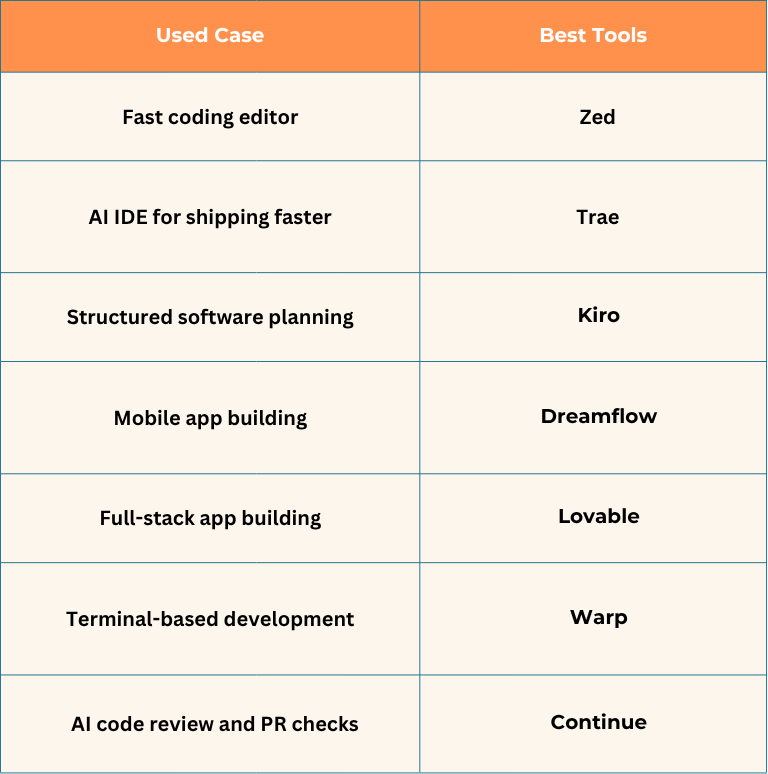
The Aqyreon Takeaway: The Real Money Is Not in the Tool — It Is in the Offer
The biggest mistake beginners make is thinking the tool itself creates income.
It does not.
A tool only becomes valuable when you attach it to an offer people already understand.
Do not say:
“I use AI coding tools.”
Say:
“I build landing pages for local businesses.”
“I create mobile app prototypes for startup founders.”
“I help small teams add AI code review to GitHub.”
“I build lead capture tools for service businesses.”
“I turn app ideas into clickable MVPs.”
That is how you turn free AI coding tools into a business opportunity.
The future belongs to people who can combine three things:
AI tools + useful problems + clear offers.
That is where the money is.
Want to start making money with AI coding tools? Pick one tool, one niche, and one simple offer. Build a demo this week. Then show it to real people who might pay for it.
Example beginner offer:
“I will build a simple AI-assisted landing page or app prototype for your business in 3 days.”
That is a much better starting point than trying to build the next billion-dollar startup on day one.