
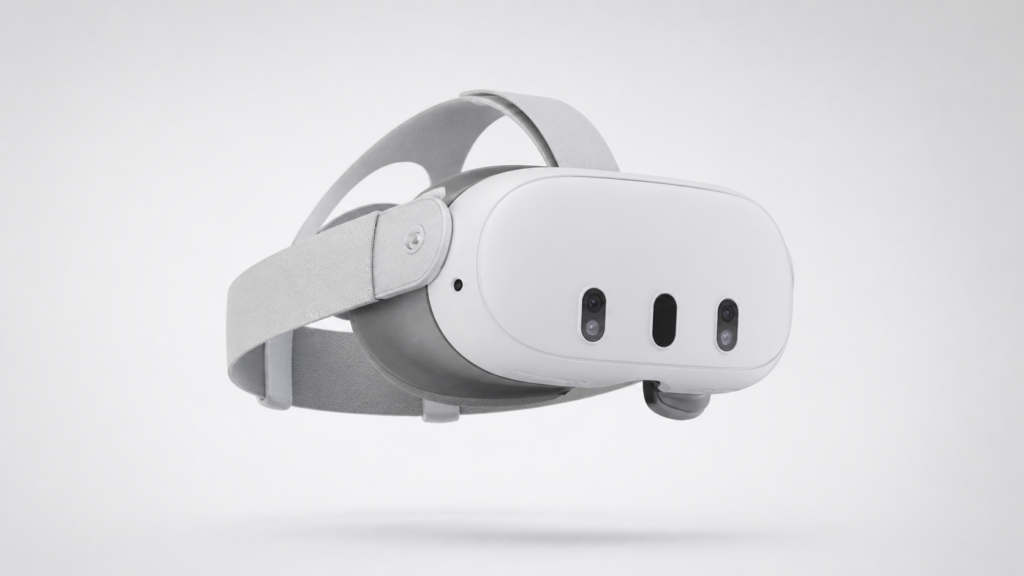
Meta Quest 3 512GB Review: Is This Wireless VR Headset Worth Buying?
The Meta Quest 3 Is Not Just a Toy Anymore
Virtual reality has spent years trying to convince everyday people that it is more than a novelty.
The Meta Quest 3 512GB gets closer than most headsets before it.
It is wireless. It does not need external room sensors. It can play standalone VR games. It supports mixed reality, so digital objects can appear inside your real space. It can also connect to a gaming PC for PCVR experiences, although that part is where buyer feedback becomes more divided.
On paper, the Quest 3 looks like one of the strongest consumer VR headsets available today. The 512GB model offers more storage, a sharper display, Meta Horizon+ trial access, and enough power to make older Quest headsets feel dated.
But this is not a perfect product.
The reviews reveal a clear pattern: people love the visuals, wireless freedom, mixed reality, and upgrade over Quest 2. But many complain about battery life, comfort, Meta’s ecosystem, PC Link issues, support frustrations, and the fact that you may need extra accessories to get the best experience.
So the real question is not just, “Is the Meta Quest 3 good?”
The better question is:
Is the Meta Quest 3 512GB good enough to justify the price, accessories, and limitations?
Let’s break it down the Aqyreon way.
Quick Verdict
The Meta Quest 3 512GB is one of the best mainstream wireless VR headsets for people who want gaming, fitness, mixed reality, media watching, and standalone VR without a PC.
It is especially strong for:
- Quest 2 owners who want sharper visuals and better performance.
- First-time VR buyers who want a strong all-in-one headset.
- Casual gamers who want wireless VR without complicated setup.
- Fitness and rhythm game users.
- People who want to explore mixed reality without paying Apple Vision Pro money.
But it may disappoint:
- Heavy PCVR users who expect flawless wired or wireless PC connectivity.
- Parents buying for younger kids without fully understanding the content and safety setup.
- Buyers who expect long battery life out of the box.
- People who hate wearing front-heavy headsets.
- Users who do not want to buy a better strap or battery accessory.
Aqyreon Rating: 8.4/10
Great headset. Strong upgrade. Best when paired with comfort and battery accessories.
Verified Specs and Key Features
The Meta Quest 3 uses the Snapdragon XR2 Gen 2 platform, which Meta advertises as delivering 2x graphical processing power compared with Quest 2. It also has 8GB of RAM, 512GB storage, full-color passthrough, and an estimated 2.2-hour battery life depending on usage. The Amazon listing for this 512GB bundle also advertises a 3-month Meta Horizon+ trial with access to 40+ games.
The display resolution is listed as 2064 × 2208 pixels per eye, with support for up to 120Hz refresh rate. This is one of the biggest reasons buyers describe the Quest 3 as noticeably clearer than older VR headsets.
The Amazon product page also lists the included box contents as the Meta Quest 3 headset, two Touch Plus controllers with wrist straps and AA batteries, charging cable, and power adapter.
What Makes the Meta Quest 3 Different?
The biggest difference is freedom.
Older VR systems often required cables, external sensors, base stations, or a powerful PC. The Quest 3 removes much of that friction. You can put it on, draw your boundary, and start playing. Several reviewers specifically praised how easy the setup is compared with older wired headsets like the Oculus Rift, HTC Vive, or HP Reverb G2.
That matters because VR’s biggest enemy has always been inconvenience.
A headset can have great specs, but if it takes too long to set up, people stop using it. The Quest 3’s biggest win is that it makes VR feel more approachable.
Visual Quality: This Is Where the Quest 3 Shines
The most consistent praise from customer reviews is visual clarity.
Buyers describe the Quest 3 as sharper, clearer, more vibrant, and easier to focus than previous-generation headsets. The pancake lenses are a major part of this. Compared with older Fresnel lenses, pancake lenses generally provide a larger sweet spot, meaning you do not have to position your face as perfectly to get a clear image.
For Quest 2 users, this is one of the biggest reasons to upgrade.
Text is easier to read. Menus look cleaner. Distant objects in games are clearer. Games that already looked decent on Quest 2 can feel smoother and more polished on Quest 3.
A reviewer who upgraded from Quest 2 described the difference as “night and day,” especially in sharpness, sound, storage, and performance. Another said that even games not specifically updated for Quest 3 looked smoother.
Aqyreon interpretation:
The Quest 3 is not just a spec upgrade. It improves one of the most important parts of VR: visual comfort. Clearer lenses reduce frustration, make games feel more immersive, and make the headset easier to use for longer sessions.
The catch
The Quest 3 still uses LCD displays, not OLED. That means black levels can look gray in dark scenes. Some buyers who wanted a premium movie-theater experience complained that the headset was not ideal for deep blacks or cinematic contrast.
So, for gaming and mixed reality, the visuals are excellent for the price category. For movie purists expecting OLED-level darkness, it may fall short.
Performance: A Real Upgrade Over Quest 2
The Quest 3 is powered by the Snapdragon XR2 Gen 2 chip, and the performance improvement is one of the headset’s strongest selling points. Meta advertises the headset as having double the graphical processing power compared with Quest 2, and customer reviews mostly support that claim in real-world use.
Games load faster. Menus feel snappier. Quest-enhanced titles look better. Mixed reality apps run more smoothly. Buyers also mentioned that older games often feel cleaner and more responsive.
This does not mean the Quest 3 performs like a high-end gaming PC. It does not. Standalone VR still has limits. Some games still look more stylized than realistic, and several reviewers said VR content still needs more high-quality AAA titles.
But for a self-contained wireless headset, the Quest 3 is impressive.
Aqyreon takeaway:
The Quest 3 is powerful enough to make standalone VR feel serious, but not powerful enough to replace high-end PCVR for hardcore simulation or ultra-premium graphics users.
Mixed Reality: Fun, Promising, but Still Early
Mixed reality is one of the most exciting parts of the Quest 3.
Instead of fully blocking out your surroundings, the headset uses color passthrough cameras to show your room while placing digital objects inside it. This allows experiences like tabletop games on your real table, portals opening in your wall, fitness apps in your living room, and virtual screens floating in your space.
Several reviewers were surprised by how much they enjoyed mixed reality. One mentioned setting up a DnD-style table over a real table. Others talked about zombies appearing in their house, puzzle games, and AR-style experiences.
But the feedback is not all positive.
Many buyers say passthrough is useful but grainy. It works for room awareness, quick adjustments, and mixed reality games, but it is not as clear as promotional videos may make it seem. Some users said they could not comfortably read a phone or monitor unless it was close.
Aqyreon interpretation:
Mixed reality on Quest 3 is not perfect spatial computing yet. It is more like a strong preview of where gaming and home computing may be going.
It is good enough to enjoy. It is not good enough to replace your real monitor, phone, or TV for every task.
Storage: Why the 512GB Model Makes Sense
The 512GB version is not just about bragging rights.
VR games and Quest-enhanced apps are getting larger. If you plan to download many games, media apps, fitness apps, experimental mixed reality apps, or use the headset with larger experiences, 512GB gives you breathing room.
Several reviewers said they originally questioned the storage upgrade but later appreciated having more space. One buyer said 256GB might have been enough for them personally, while others said 512GB was worth it because games are getting bigger.
Who should choose 512GB?
Choose the 512GB model if you:
- Plan to install many games.
- Share the headset with family.
- Hate deleting and reinstalling apps.
- Want to keep fitness, gaming, media, and productivity apps installed.
- Plan to keep the headset for several years.
The smaller storage version may work for casual users with fast internet, but 512GB is the safer long-term choice.
Game Library: Good, Growing, but Not Perfect
The Quest ecosystem has a large and growing library of games and apps. The Amazon listing for the 512GB bundle advertises a 3-month Meta Horizon+ trial with access to 40+ games.
Buyers praised games like Superhot VR, Beat Saber, Thrill of the Fight, ping pong games, puzzle apps, mixed reality mini-games, fitness apps, and media apps.
The headset also works with apps for entertainment, workouts, relaxation, productivity, virtual screens, and social VR.
But there is a recurring criticism: some users feel the game library still lacks enough deep, polished, AAA-style experiences. A few described many games as mobile-like, experimental, or overpriced for what they offer.
Aqyreon takeaway:
The Quest 3 has enough content for most beginners and casual VR users. Hardcore gamers may still want more premium titles.
PCVR: Powerful Potential, Mixed Real-World Feedback
This is one of the most important sections.
The Quest 3 can be used for PCVR through wired or wireless methods, including Meta Quest Link, Air Link, Steam Link, and Virtual Desktop. Some reviewers had excellent experiences using the Quest 3 with SteamVR and PC games. Others said PC Link was unreliable, glitchy, or frustrating.
This split matters.
For buyers who mainly want standalone VR, the Quest 3 is easy to recommend.
For buyers who mainly want serious PCVR, the answer is more complicated. Some users will have a smooth experience with the right router, cable, PC specs, and software setup. Others may run into connection issues, lag, crashes, or software frustration.
Aqyreon recommendation:
Buy the Quest 3 primarily as a standalone wireless VR headset. Treat PCVR as a bonus, not the only reason to buy it.
Battery Life: The Biggest Everyday Weakness
Battery life is the most consistent complaint.
Meta and retail listings advertise around 2+ hours or 2.2 hours of battery life, depending on usage.
Customer reviews strongly support that range. Many users report around 1.5 to 2.5 hours, with mixed reality, casting, setup, downloads, and heavier games draining the battery faster.
Some users are fine with this because VR sessions can become tiring anyway. Others find it unacceptable, especially for gaming, movies, workouts, or family use.
The most common fix is buying a battery head strap or external battery pack.
Aqyreon buyer warning:
Do not budget only for the headset. Budget for a better strap with battery support if you want the best experience.
Comfort: Good Design, Weak Stock Strap
The Quest 3 is slimmer than older headsets, and many users say it feels better balanced than Quest 2. But the stock strap receives heavy criticism.
A lot of buyers say the included strap is uncomfortable for long sessions. Some describe pressure on the forehead, face fatigue, headaches, or the headset feeling front-heavy.
This is not unusual in VR, but it matters because it turns a $500–$600 product into something that may need another accessory to feel complete.
Best comfort upgrade:
A third-party battery head strap or halo-style strap can improve comfort and extend playtime at the same time.
Aqyreon interpretation:
The Quest 3 headset is impressive. The default strap feels like the compromise Meta made to keep the box price lower.
Controllers and Tracking
The Touch Plus controllers remove the old tracking rings, and many reviewers liked the cleaner design. Buyers described the controllers as comfortable, responsive, and better than the Quest 2 controllers.
Tracking is generally praised, especially for standalone gaming, rhythm games, fitness, and room-scale play.
However, a few reviews mention controller defects, stick drift, or tracking issues. These appear to be less common than the positive feedback, but they are worth watching for during the return window.
Buyer tip:
Test both controllers immediately after setup. Try fast movement games, menu navigation, button presses, and thumbstick movement before the return window closes.
Media and Productivity: Surprisingly Useful
The Quest 3 is not just for gaming.
Reviewers mentioned watching movies, anime, YouTube, streaming services, using virtual desktops, playing Xbox on a large virtual screen, and even working with multiple virtual displays.
This is where the device starts to feel bigger than gaming. It becomes a portable entertainment and productivity screen.
But again, expectations matter.
For casual media watching, it can be fun and immersive. For serious movie lovers, the LCD black levels and headset comfort may limit long sessions.
Parents Should Think Carefully Before Buying
Several reviews raise important concerns for parents.
The Quest 3 can be fun for teens and families, but it is not the same as buying a Nintendo Switch or traditional console. VR is more physically immersive, more isolating, and more connected to online social spaces.
Parents should consider:
- Age appropriateness.
- Game ratings.
- Social VR interactions.
- Motion sickness.
- Screen time.
- Headset weight.
- Parental control setup.
- Whether each family member needs their own headset for multiplayer.
The Amazon listing shows an age range description of 10+, but parents should still evaluate whether the content and social features are appropriate for their child.
Aqyreon parent note:
The Quest 3 is powerful technology, not just a toy. Parents should set it up themselves, review privacy settings, supervise younger users, and test comfort before allowing long play sessions.
Pros and Cons
Pros
- Excellent visual clarity compared with older Quest models.
- Strong standalone performance.
- Wireless design with no external sensors required.
- Mixed reality is fun and promising.
- 512GB storage is great for long-term use.
- Pancake lenses improve clarity and reduce the small sweet spot problem.
- Good app and game library for casual and mainstream VR users.
- Works for fitness, gaming, entertainment, and productivity.
- Touch Plus controllers feel cleaner without tracking rings.
Cons
- Battery life is short.
- Stock strap is not comfortable enough for many users.
- Mixed reality passthrough can look grainy.
- PCVR experience is inconsistent depending on setup.
- Some buyers report support and replacement frustrations.
- Accessories may be needed for the best experience.
- Not ideal for users expecting OLED-level movie quality.
- Family multiplayer can get expensive because each person may need their own headset.
Who Should Buy the Meta Quest 3 512GB?
The Quest 3 512GB is a strong buy for:
- First-time VR users who want a premium mainstream headset.
- Quest 2 owners who want a real visual and performance upgrade.
- Fitness gamers.
- VRChat, Beat Saber, Superhot, boxing, ping pong, and rhythm game fans.
- People who want mixed reality experiences.
- Users who want a wireless headset without external sensors.
- Buyers who want enough storage to avoid deleting apps constantly.
Who Should Skip It?
You may want to skip or reconsider if:
- You mainly want a dedicated PCVR headset.
- You hate short battery life.
- You do not want to buy accessories.
- You are sensitive to motion sickness.
- You expect Apple Vision Pro-level passthrough.
- You want deep OLED blacks for movie watching.
- You are buying for a young child without supervision.
Ready to Step Into Wireless VR?
The Meta Quest 3 512GB is one of the strongest all-in-one VR headsets for gaming, fitness, mixed reality, and entertainment. It gives you sharper visuals, stronger performance, wireless freedom, and enough storage to build a serious VR library.
But here is the smart buyer move:
Do not buy it blindly. Buy it with the right expectations.
Get the Quest 3 if you want the best mainstream wireless VR experience right now. Add a better head strap or battery strap if you plan to play longer than short sessions.
Recommended setup:
Meta Quest 3 512GB + battery head strap + lens protection + carrying case.
That combination turns the Quest 3 from a good headset into a much better everyday VR system.
Affiliate Disclosure Placement:
This article may contain affiliate links. If you buy through our links, Aqyreon may earn a commission at no extra cost to you. We only recommend products based on practical value, verified product details, and real buyer feedback.